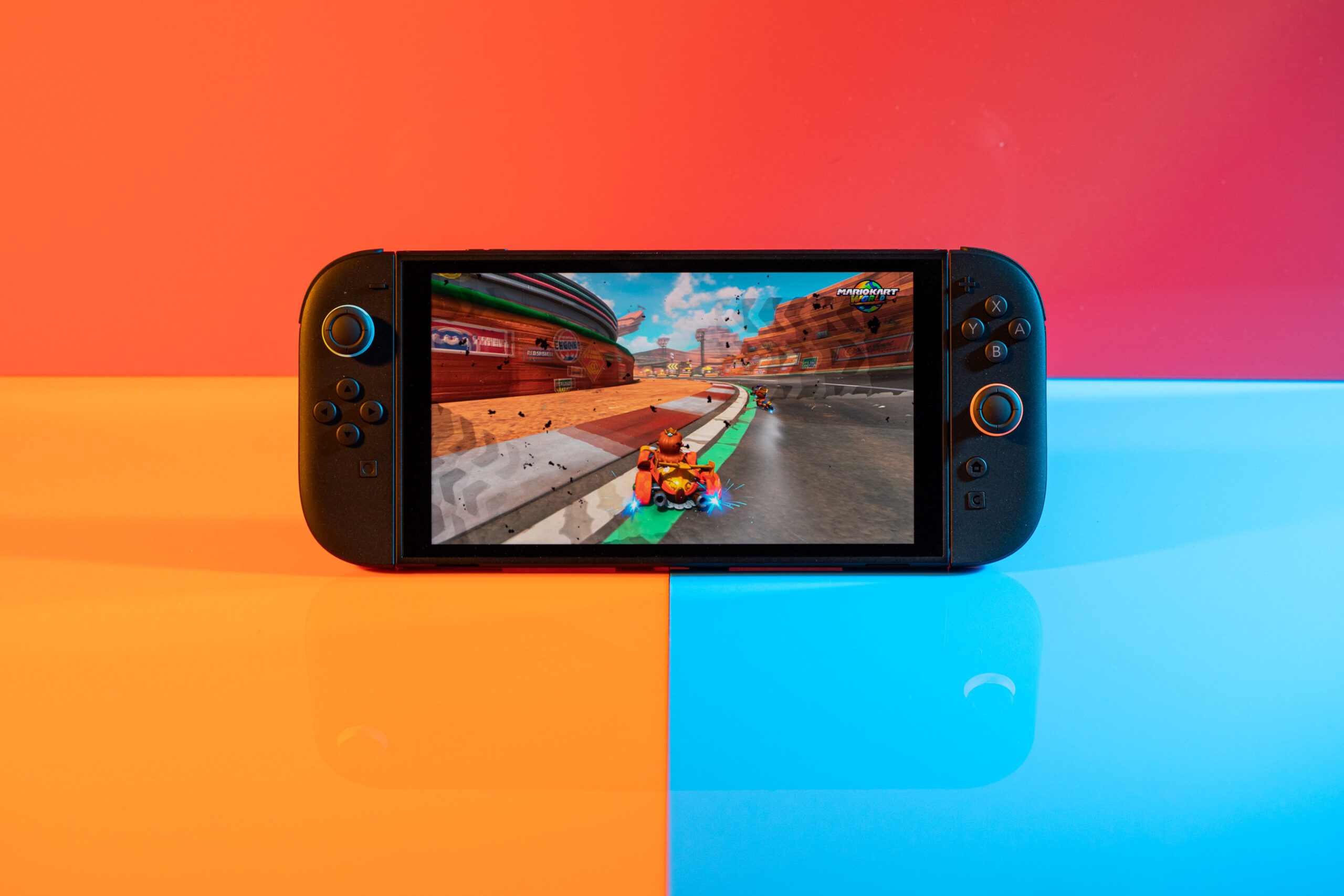


The first Switch was such a hit that Nintendo decided not to mess with a good thing. Instead of releasing a successor that feels like a generational leap or a pivot in a new direction, it’s following up the hugely successful original with the Switch 2 – a welcome upgrade that largely sticks to the formula. It looks about the same, works about the same, and plays most of the same games. It’s the Switch, just better.
Nintendo’s bet is that it doesn’t have to wow people all over again, and so it made a sequel that’s only as good as it needs to be. After spending a week with the new console, I’ve realized that good enough is exactly what the Switch needed.
A refined (and bigger) Nintendo Switch
Fundamentally, the concept of the Switch hasn’t changed. It’s still a tablet with a split controller stuck on either side, with a dock that connects to your television.
But the idea has been refined. The Switch 2 is much bigger, for one thing. It now has a 7.9-inch LCD panel, up from the original’s 6.2 inches, making it great for playing text-heavy games. It also means the entire device has become larger as a result, now weighing in at a comparatively hefty 1.18 pounds with the controllers attached. The larger size hasn’t bothered me, though your mileage may vary. My 12-year-old keeps stealing it to play Pokémon and hasn’t complained. But she’ll do anything for more screentime.
There are some other nice upgrades. Like the most recent OLED model of the original Switch, the Switch 2 has a kickstand that can prop the system up at a wide range of angles, and the updated version feels a little sturdier to me, making it great for playing in tabletop mode. It’s a huge improvement over the original Switch’s flimsy kickstand. The Switch 2 also adds a second USB-C port to the top of the console, which enables you to plug in a webcam for online play. It’s handy for attaching a charger or battery pack whichever way is most convenient, too.
What you get with that larger and heavier device is games that look and run better. The handheld’s screen has a 1920 x 1080 resolution, which supports HDR10 and VRR up to 120Hz. It’s bright and crisp, and games look a lot smoother thanks to the higher refresh rate. But I do miss the more vibrant OLED display of the most recent iteration of the original Switch, which featured deeper blacks and more contrast-y images. The new screen is a huge leap from the original, but it isn’t an all-around improvement if you’ve been using the OLED for a while.
The story is different when connected to your TV: the Switch 2 can finally output at 4K, with support for HDR10. You’ll need to play supported games to really take advantage of this, but it’s immediately noticeable how much crisper everything from text to gameplay is. HDR promises to make games more vibrant, though there doesn’t seem to be a standout game to show this off just yet.

Games are bigger this generation, too. Nintendo has increased the internal storage size to 256GB, but you’ll need to be diligent with how you use it; Cyberpunk 2077, for example, takes up 59GB on its own. Expanding that storage means buying a new and relatively expensive microSD Express card; your old microSD cards won’t work.
More annoying is that the battery life is worse than the original Switch. Nintendo estimates between two and six and a half hours of gameplay on a single charge, and I found my device dying around the lower end of that spectrum, especially when playing more intensive games like Cyberpunk. That’s not a great sign for the future if the Switch 2 continues to get more demanding games.
Some of this owes to the fact that this is simply a much more capable console. It’s built around a new Nvidia chip, custom designed for the Switch 2, and offering modern features like DLSS and ray tracing. There’s more RAM. The internal storage is faster. This is why the Switch 2 is able to run a game as demanding as Cyberpunk; it’s also why the Switch 2’s battery might die after a short two-hour stint.
The Switch 2 also has slightly redesigned Joy-Con controllers. They’re functionally mostly the same, but bigger and with a few small upgrades, like more subtle vibrations. They connect via magnets now, which are less fiddly than the previous rail design. Nintendo says that the joysticks have been redesigned, too, but they still aren’t using anti-drift Hall effect sensors. That means there’s a chance owners will once again be dealing with the dreaded Joy-Con drift that plagued the original Switch.
As similar as they are, the Joy-Con also introduces some of the truly new elements of the Switch 2.
To start, the right Joy-Con has an all-new button dedicated entirely to Nintendo’s GameChat social features. Chatting with friends while playing games isn’t a new concept, but Nintendo has finally made it not only a core but a relatively painless part of its user experience. You simply pull up the app, and you can see what friends are online and what they’re playing.
For the most part, it works as advertised. It’s easy to connect, voices come in clear through the Switch 2’s built-in mic, and video looks fine over the USB camera from Nintendo, which is sold separately. (The Switch 2 also supports an unclear number of third-party webcams.) This is a huge upgrade over Nintendo’s old way of doing things, where you needed to download a separate Nintendo Switch Online app onto your phone and use that secondary device to chat.
The one flaw I’ve noticed with the new system is that screensharing — in which, for instance, four people can share their gameplay in Mario Kart World while they race against each other — looks choppy and ugly, to the point that I stopped using it.
The redesigned Joy-Con controllers also introduce a new control option. By turning the Joy-Con on its side and placing it down on a flat surface, you’re able to use it like a mouse. Unfortunately, the Switch 2 doesn’t come with a next-gen version of Mario Paint to show all the mouse clicking possibilities, but I spent some time with the Switch 2 update of Civilization VII to test it out. And while it took some getting used to, I found the Switch 2’s mouse controls worked surprisingly well. This may not be as true in a twitchy first-person shooter where every millimeter matters, but for turn-based strategy, the mouse was a big improvement over a standard controller layout.
In a nice touch, using the mouse is seamless; you don’t choose the option from a menu, you simply turn the Joy-Con on its side, place it down, and it begins mouse mode. This makes it easy to swap between control options on the fly. You also don’t need to use the mouse on a completely flat surface like a table or desk. I was able to play Civ just fine moving the Joy-Con around on my thigh.
However, it wasn’t particularly comfortable to play that way for extended periods. So it’s hard to see it as something I’ll use often.
So yes, the Switch 2 is exactly what it sounds like hardware-wise: it takes a winning concept and improves on it in subtle ways, and mostly doesn’t mess with what already worked. None of the changes are a huge leap, nor are any of the issues dealbreakers.