Copy trading has become one of the most popular strategies in crypto, allowing traders to automatically mirror the moves of profitable wallets, but most bots fail because they copy the wrong wallets or react too slowly to on-chain events.
Building a profitable copy trading bot requires three key capabilities: scouting high-opportunity pools, analyzing wallet profitability, and executing trades in real-time.
In this step-by-step guide, we’ll show you how to build a high-frequency crypto copy trading bot using Python and the CoinGecko API. This guide provides production-ready code that you can run locally and extend for your own trading strategies.
Disclaimer: This tutorial is for educational purposes only and does not constitute financial advice. Copy trading involves significant risk, and past performance does not guarantee future results. Always do your own research before trading.
Prerequisites
You’ll need the following to build the copy trading bot:
-
CoinGecko API Key: Follow this guide on how to get your free Demo API key. While basic pool discovery endpoints are available on the free Demo plan, a paid API plan (Analyst and above) grants access to the WebSocket API, which is required to achieve the sub-second latency needed to remain competitive in high-frequency copy trading.
-
Python Environment: Python 3.8+ with the following packages:
requests: For HTTP API calls
websockets: For real-time trade streaming
pandas: For data analysis
python-dotenv:For secure credential management
-
Block Explorer API: We’ll use Blockscout’s free API for transaction verification.
Setting Up the Project
Let’s start by setting up the development environment for our copy trading bot.
Step 1: Initialize the project
First, create a new directory and set up the Python environment:
mkdir copy-trading-bot
cd copy-trading-bot
python -m venv venv
source venv/bin/activate # On Windows: venv\Scripts\activate
Step 2: Install dependencies
Create a requirements.txt file with the following dependencies:
requests>=2.31.0
websockets>=12.0
pandas>=2.0.0
python-dotenv>=1.0.0
Install them with:
pip install -r requirements.txt
Step 3: Configure environment variables
Create a .env file in the project root with your API keys:
CG_DEMO_API_KEY=your_demo_key_here
CG_PRO_API_KEY=your_pro_key_here # Required for WebSocket features
Step 4: Set up the base configuration
Create copy_trading_bot.py with the foundational imports and configuration:
This sets up secure credential handling and implements exponential backoff for rate limiting – essential for any production-grade trading bot.
How to Find Profitable Tokens and Pools in Real-Time
The first step in building a successful copy trading bot is identifying which tokens and pools to target. Rather than guessing randomly, you can use CoinGecko’s On-chain APIs to programmatically identify trending tokens and liquidity pools based on real trading activity.
Using the Trending Pools Endpoint
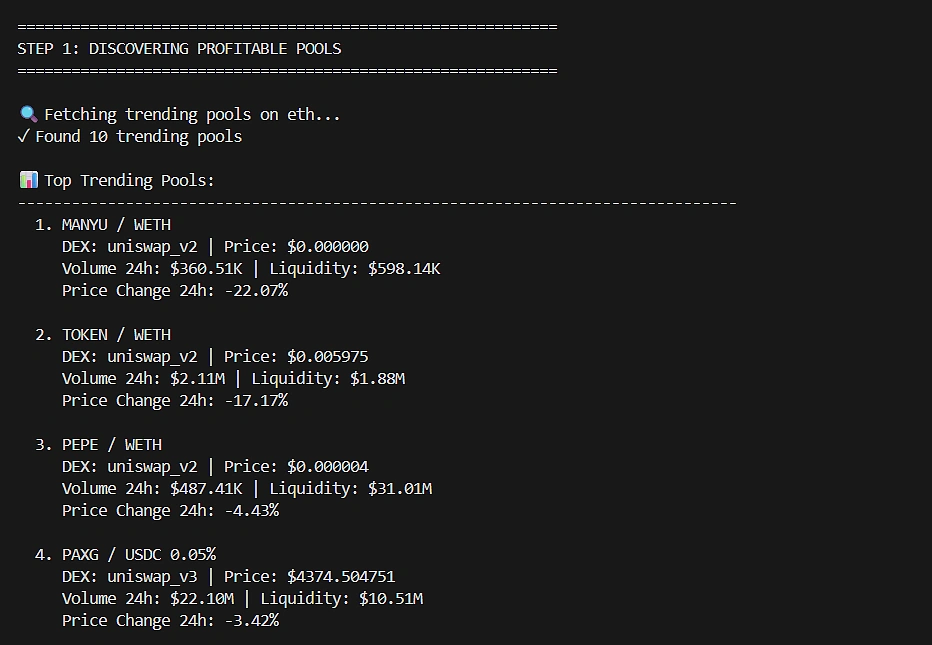
The /onchain/networks/{network}/trending_pools endpoint is available on the free Demo plan and returns pools that are currently trending based on volume and activity.
Sample output when running this function:
Using the Megafilter Endpoint
For more advanced pool discovery, the exclusive /onchain/pools/megafilter endpoint allows you to filter pools by specific criteria like volume, liquidity, and transaction count.
The strategy here is to find pools with high volume but relatively low liquidity – these are often higher volatility opportunities:
How to Find Profitable Wallets In a Pool
Once you have a target pool or token, the next step is identifying which wallets are actually profitable traders worth copying. You can use the /onchain/networks/{network}/pools/{pool_address}/trades endpoint to fetch recent trades and analyze each wallet’s realized profit or loss (PnL).
Fetching Pool Trades
Analyzing Wallet Profitability
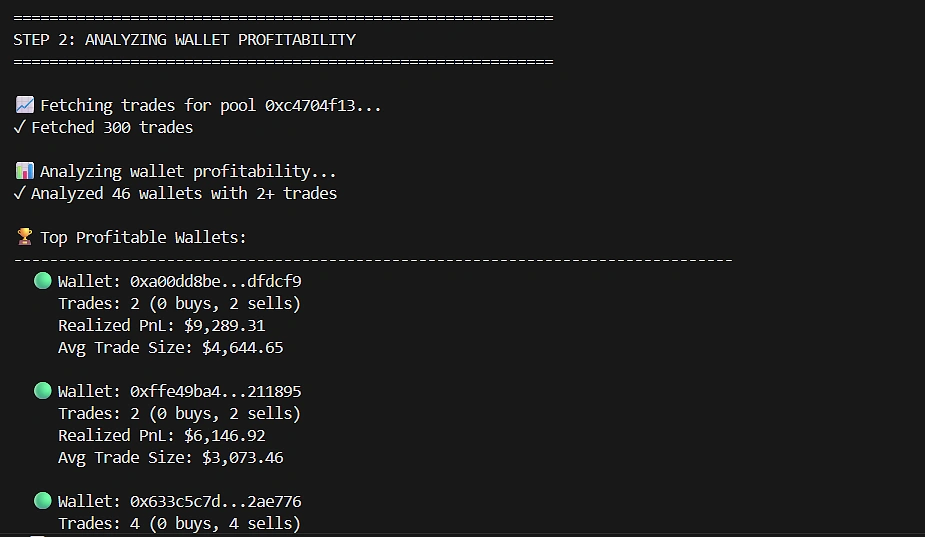
With the trade data, we can calculate realized PnL for each wallet. The script below groups trades by wallet address and aggregates buy and sell positions to compute each wallet’s net profit or loss:
Note: Realized PnL is one of the most practical signals you can extract from on-chain trade data. It’s a strong starting point for ranking wallets, but keep in mind that other factors such as sample size, consistency, and risk taken also matter. This gives you a good starting point for identifying potentially profitable wallets to copy.
Sample output:
How to Detect On-chain Trades in Real-Time
You can detect on-chain trades in real-time using the CoinGecko WebSocket API, which streams trade data through a persistent connection the moment transactions occur, providing sub-second latency. In copy trading, this execution speed determines profitability. If your bot detects a leader’s trade even seconds after it happens, the price has already moved, leaving you to execute at a worse price or miss the opportunity entirely. Real-time streaming is what enables your bot to react fast enough to capture the same entry prices as the wallets you’re copying.
CoinGecko’s WebSocket API covers real-time data streams for over 20 million tokens across 250+ networks, allowing you to scale across all supported chains using the same infrastructure without requiring separate integrations.

Subscribing to Trade Streams
We will use the CoinGecko OnchainTrade WebSocket API channel to stream real-time swap events as they occur on-chain. We use this specific channel because it provides the transaction hash immediately upon trade execution, which is exactly what we need to verify and copy trades with minimal latency.
When a trade is detected, the WebSocket pushes data including the tx_hash, which is crucial for the next step, verifying the transaction and executing the copy trade.
How to Execute the Copy Trade Logic
The final piece of the puzzle is matching the real-time trade stream to your target wallets and executing the copy trade. Here’s the workflow:
-
Receive: WebSocket pushes a trade event containing a tx_hash
-
Verify: Query Blockscout API to get the transaction’s from address
-
Match: Check if the from address matches your target wallets
-
Execute: If it matches, trigger your buying logic
Verifying Transactions with Blockscout
The CoinGecko WebSocket stream is optimized for speed and lightness. It delivers the transaction hash immediately without the full transaction details such as the originating wallet address. To determine whether a trade came from a wallet we want to copy, we can perform a reverse lookup using Blockscout’s transaction API. This lets us fetch the from address for any transaction hash and match it against our target wallet list:
Paper Trading Engine
For safety, we implement a paper trading engine first. This uses proportional allocation, which means sizing trades as a percentage of the follower’s equity rather than copying the leader’s exact position size.
Here’s why this matters: if a leader trades 10% of their $100,000 wallet ($10,000), and you have a $1,000 wallet, proportional allocation means you trade 10% of your equity ($100). The alternative, fixed-size mirroring, would have you match the leader’s $10,000 trade exactly, which would instantly over-leverage your account and likely lead to liquidation during any volatility.
Proportional allocation ensures your risk exposure scales with your capital, not the leader’s
Reminder: In production, you would integrate with a DEX to execute real trades. The code above demonstrates the logic in a paper trading environment.
Putting It All Together
To summarize the complete workflow: the bot monitors the WebSocket stream for new trades, verifies each transaction against your target wallet list via Blockscout, calculates a proportional position size based on your equity, and executes (or simulates) the copy trade. All of this happens within milliseconds of the leader’s original transaction.
Here’s the complete workflow in action:

Building a Dashboard UI
While the Python script works great for backend automation, having a visual dashboard makes it much easier to monitor your copy trading bot in real-time. We’ve built a simple React-based web interface that brings all the bot’s functionality into an intuitive UI.

The dashboard includes several key components:
-
Stats Overview: At the top, you’ll see real-time metrics including your paper equity, number of target wallets being monitored, total trades observed, copied trades executed, and your current paper PnL.
-
Pool Discovery: Select your target network (Ethereum, Base, etc.) and fetch trending pools with a single click. The table displays pool names, DEX sources, and 24-hour volume – making it easy to identify high-activity opportunities.
-
Wallet Analysis: After selecting a pool, analyze the trading wallets within it. The UI shows each wallet’s trade count, realises PnL, and lets you add profitable wallets to your target list with one click.
-
Target Wallets & Controls: Configure your paper trading equity and maximum position size percentage. Manage your target wallet list and start/stop the live monitoring with dedicated controls.

-
Live Trade Feed: Once monitoring starts, watch trades stream in real-time. Target wallet trades are highlighted with a star icon so you can immediately see when your copied wallets are active.
-
Activity Log: A console-style log tracks all bot actions – from fetching pools to detecting target wallet trades – giving you full visibility into what the bot is doing.
The UI is built with React and served via a simple Express server. You can find the complete source code in the public/ directory of the GitHub repository.
Conclusion
You’ve now built a sophisticated crypto copy trading bot that:
-
Discovers trending tokens and pools using CoinGecko’s On-chain APIs
-
Analyzes wallet profitability to identify traders worth copying
-
Monitors trades in real-time using CoinGecko’s WebSocket API for sub-second latency
-
Executes proportional copy trades with slippage protection
Data speed is the competitive advantage in copy trading. With CoinGecko’s WebSocket API providing real-time on-chain trade streams across 250+ networks and 20M+ tokens, you have the foundation to build a high-frequency copy trading system.
However, remember that copy trading is just one tool in your trading arsenal. Market conditions, risk management, and diversification across multiple wallets all play a role in long-term success.
Disclaimer: This tutorial is for educational purposes only and does not constitute financial advice. Cryptocurrency trading involves substantial risk of loss. Past performance of copied wallets does not guarantee future results. Always do your own research and consider consulting a financial advisor.
Ready to build your own production-ready copy trading bot? Consider subscribing to a paid API plan to access exclusive features such as the on-chain Megafilter endpoint and WebSocket API needed for high-frequency trading.
If you enjoyed this article, be sure to check out others like how to build a DEX aggregator to find the best swap rates across multiple exchanges.