
WebStorm has always been at the forefront of technological advancements and developer experience enhancements. And with the arrival of the ACP, WebStorm becomes even more customizable, as developers can collaborate with their preferred agent to create software using their preferred technology.
For instance, if your team already has a subscription with Anthropic, OpenAI, or Google, you can now use it directly in WebStorm – with no additional JetBrains AI subscription required. JetBrains AI is still there as a convenient way to manage multiple models in one place, but it’s no longer your only option.
This is made possible by the Agent Client Protocol (ACP), an open standard that decouples the IDE from the AI agent – the same idea as the LSP, but for AI. Just as LSP meant you didn’t have to switch editors to get better tooling for a new language, ACP means you don’t have to leave WebStorm to use a specific agent that excels at, say, React refactoring or architectural planning.
In practice, this means you can orchestrate a fleet of specialized agents, switching between them as easily as you switch tabs, while keeping WebStorm’s deep local indexing.
This flexibility matters. Independent benchmarking of Figma-to-code tasks found that no single agent is the leader in every area: agents that scored well on component architecture (3.3–3.6 out of 5) dropped sharply on design token extraction (1.7–2.9). Every agent has different strengths. ACP lets you use them where they can deliver the most value.
And the landscape keeps shifting, so the agent that leads today may not be the one that leads next month. ACP means you don’t have to commit to a single provider to stay current; you can switch agents, not IDEs.
Interoperability via ACP
Instead of WebStorm building a custom integration for every new agent on the market, any agent that implements ACP becomes a first-class citizen in your editor. GitHub Copilot already ships an ACP server, Claude Code has an official ACP adapter, and more major agents are following suit.
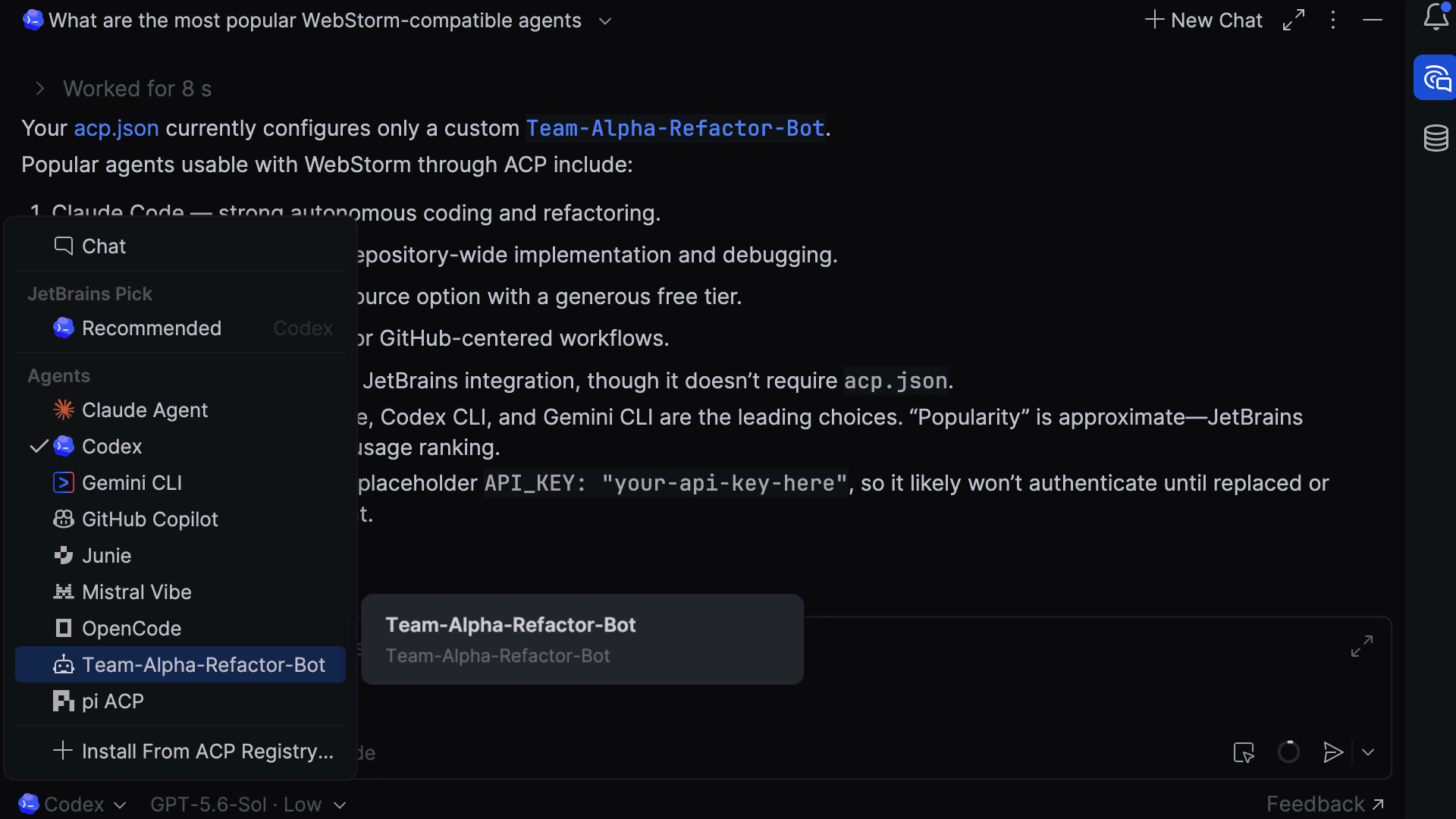
- Agent Client Protocol (ACP): Standardizes how the IDE sends context (files, diffs, and terminal output) to an agent and how the agent sends back actions (file edits, tool calls, and shell commands).
- Registry and custom agents: Use curated agents from the JetBrains registry (like Junie) or connect your own private, ACP-compliant agent via a simple acp.json configuration.
- BYOK and infrastructure control: Because ACP is provider-agnostic, teams can point their agents to any backend – Azure, AWS, Anthropic, or local LLMs – maintaining full governance over their data.
Specialization isn’t a bug
In addition to industry volatility, with new agents being released and the leading agents changing every month, agents are also trained on different data and built for different tasks. One might be great at turning a Figma spec into a component. Another could be better at reasoning through a messy refactor. A third might handle debugging well because it’s good at reading stack traces alongside source code.
None of these things are flaws – just specialization.
The catch is that using this knowledge means constantly switching tools, and each tool starts fresh, with no idea what you’re working on. So most developers don’t switch. They use one agent and live with results that are “good enough” but not great.
With ACP, switching agents is cheap. Your files, your project, and your current diff stay where they are. Only the agent changes.
Deep dive: The design → code → browser pipeline
Here’s what a multi-agent workflow looks like for building a complex React dashboard.
Scaffolding with the UI specialist
When converting a high-fidelity design to code, you need an agent tuned for your component library and styling system.
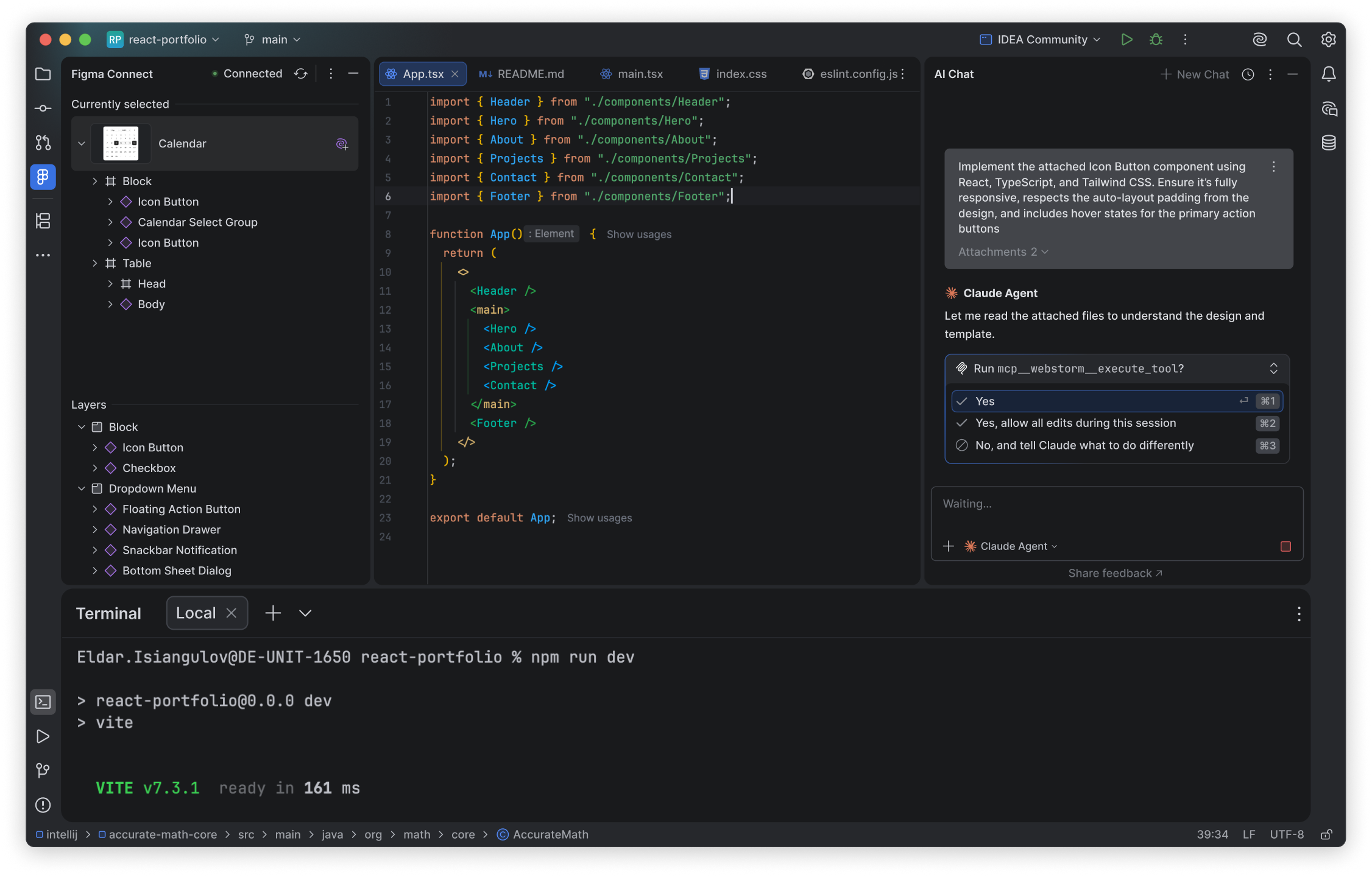
- The action: Select a “Frontend Specialist” agent from your ACP list. Figma Connect for WebStorm will then pull design context directly into WebStorm.
- The protocol: WebStorm sends the agent the relevant theme files and component specs.
- The result: The agent returns a set of file edits that the ACP server applies directly to your project.
Closing the loop with Chrome DevTools
The agent doesn’t just write code – it can verify that the code runs correctly in the browser, too.
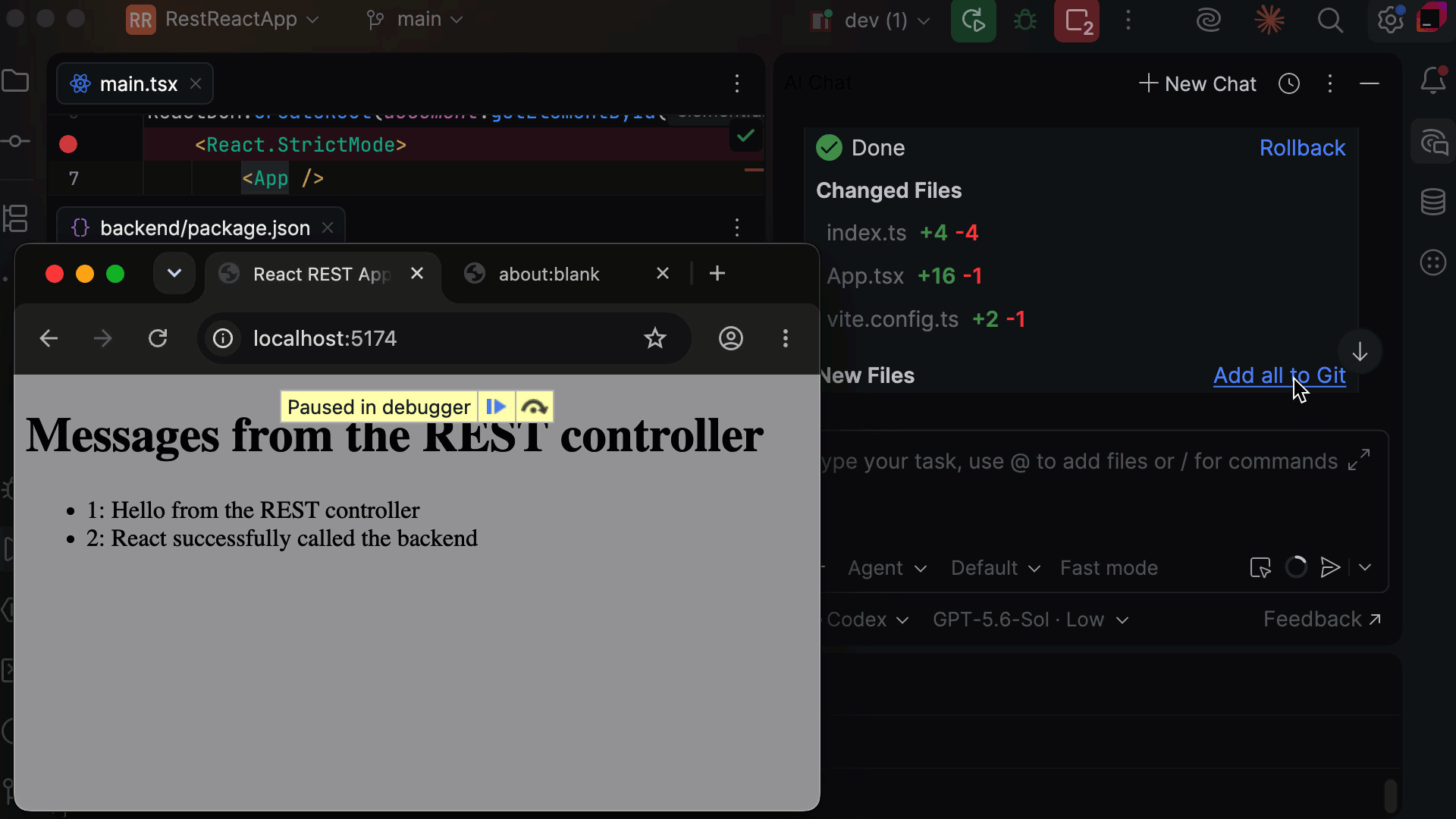
- The action: Tell the agent to fix a console error and verify the fix in the browser.
- The result: Chrome Connect, which is a bundled Chrome DevTools CLI skill in WebStorm, gives the agent direct access to Chrome. It reads console logs and network requests, traces the error to its source, applies the fix, and confirms it’s resolved. No switching environments. Only a one-time setup is required.
Built in partnership with Google’s Chrome DevTools team.
The rest of the stack
The Figma-to-browser workflow is a clear example, but the same logic applies to various other tasks that show up frequently in your day-to-day workflow:
- Commit messages: An agent tuned for conventional commits gives you cleaner, more consistent history than asking a generalist as an afterthought.
- Code review prep: Some agents are genuinely better at reading diffs and spotting patterns.
- Refactoring: Multi-file changes work better with agents that stay coherent when handling a large number of files.
- Documentation: Generated docs that people actually read tend to come from agents that write like humans, not spec sheets.
For teams
If you’re a tech lead, ACP fits into your AI governance structure. Approved providers, compliance requirements, and long-term contracts. ACP fits into that structure. Once a provider is approved, ACP provides an IDE integration that is clean, direct, and auditable, so there’s no need for middleware, a third-party relay, or extra subscriptions on top of what you already have.
Standardized tooling. Define which agents are available for your team, curate them for your stack, and deploy them without individual setup. Every developer gets the same well-matched options without having to configure anything themselves.
Data compliance. ACP communicates directly between the IDE and the agent. If your legal team has approved only one provider, ACP keeps the data flow within those established boundaries.
Custom agent deployment. Build your own ACP-compliant agents pre-loaded with internal project knowledge, coding standards, and private API documentation. Every developer gets that context without manual configuration.
No mandatory subscription lock-in. ACP lets your team connect agents directly (including ones you already pay for) without an additional JetBrains AI subscription. JetBrains AI remains the most convenient option, but it’s no longer the only one.
And because everything stays in WebStorm, you keep the code intelligence that browser-based tools don’t offer: proper indexing, accurate navigation, and real refactoring.
Choice without compromise
ACP ensures that you’re always using the best agent for the task at hand. By bringing ACP to WebStorm, we’re giving development teams the freedom to innovate with AI without losing the world-class refactoring and navigation they expect from a JetBrains IDE.
ACP is available in WebStorm now. Open the Agents menu in JetBrains AI to find it. You’ll see third-party agents there alongside Junie and Quick Edit as they become available through the JetBrains AI platform.
To connect your own agent or set up BYOK, the WebStorm documentation on ACP walks you through the steps.
WebStorm is the best place for humans – in collaboration with their favorite agents – to create software using the tools and stack of their choice. ACP makes this easier.
Tried ACP with a specific agent for a specific task? Share what you found in the comments.