
AI on your terms
When we published our YouTrack roadmap at the beginning of the year, we only briefly touched on our plans for AI. Now it’s time to share more details about how we see its role within YouTrack.
Most project management tools now ship with AI built in and switched on by default. We’ve taken a different path. You decide whether AI belongs in your workflow, and if it does, which tools you want to use. Some teams run coding agents against their backlog all day. Others have strict policies and keep AI out completely. YouTrack is built to work well for both approaches.
With YouTrack, you choose whether and how to use AI, while we also make it easier to work with the tools you already trust. In this post, we explore the three options YouTrack gives you: connect your existing tools through the Model Context Protocol (MCP), use the built-in YouTrack AI Assistant, or keep AI switched off. We’ll also preview Ask YouTrack, an agentic AI chat we’re releasing later this year.
With any of these approaches, you get the same projects, Knowledge Base, and Helpdesk on Server or Cloud. This makes YouTrack an affordable alternative to the Atlassian stack and other AI-first solutions.
AI is becoming the default. With YouTrack, it remains your choice
AAtlassian, monday.com, ClickUp, and other project management vendors are steadily expanding the role of AI in their products. Many of the teams we talk to aren’t completely ready for this shift, and their reasons vary. For some, it’s the effect on pricing; for others, it’s features they don’t need or unanswered questions about how their data is used in AI services.
When we discuss migration from Atlassian with customers, their main concerns are the announced end of Data Center support and Atlassian’s updated data contribution practices. Effective August 17, 2026, de-identified and aggregated customer data may be used to improve Atlassian’s AI experiences, with opt-out options varying by plan.
YouTrack puts AI on your terms. If you switch it on, there are three ways to use it:
- Connect your preferred AI chats, coding agents, automation platforms, IDEs, and workplace apps through YouTrack’s remote MCP server.
- Enable our built-in AI Assistant to turn selected text into tasks, summarize content, get reply suggestions, improve your writing, and more.
- Coming soon: Ask YouTrack, an agentic AI chat that understands your work. Search in YouTrack with prompts, get answers, create tasks, and propose updates – all within the chat and based on your project context. We also plan to let you bring your own key and use the LLM of your choice.
If you keep AI switched off, you still get YouTrack’s complete project management functionality, with nothing hidden behind AI features.
Option 1. Connect your AI stack to YouTrack through MCP
You can work with YouTrack from the AI applications and services your teams already use. The remote MCP server gives compatible tools access to the current YouTrack context while respecting each user’s existing permissions.
Choose from a variety of tools
AI chats – ChatGPT, Claude, Perplexity, and others
Search and summarize tasks, support tickets, and Knowledge Base articles, or create and update work directly from an AI conversation.
For example, you can easily connect YouTrack to Claude and search your project context using whatever details you have. If you’re a QA engineer managing multiplatform testing tasks, you can ask Claude to find unresolved tasks for testing on desktop, review them, and create a related task for similar testing on mobile devices in the same chat.

Coding agents and IDEs – PyCharm, IntelliJ IDEA, Claude Code, Cursor, Codex, and others
Give agents the YouTrack context they need, so they can find related documentation and reflect development progress in tasks, all without leaving your coding environment. For example, when implementing a new product feature, developers can ask Claude Code directly in IntelliJ IDEA to create the subtasks they need to tackle next.
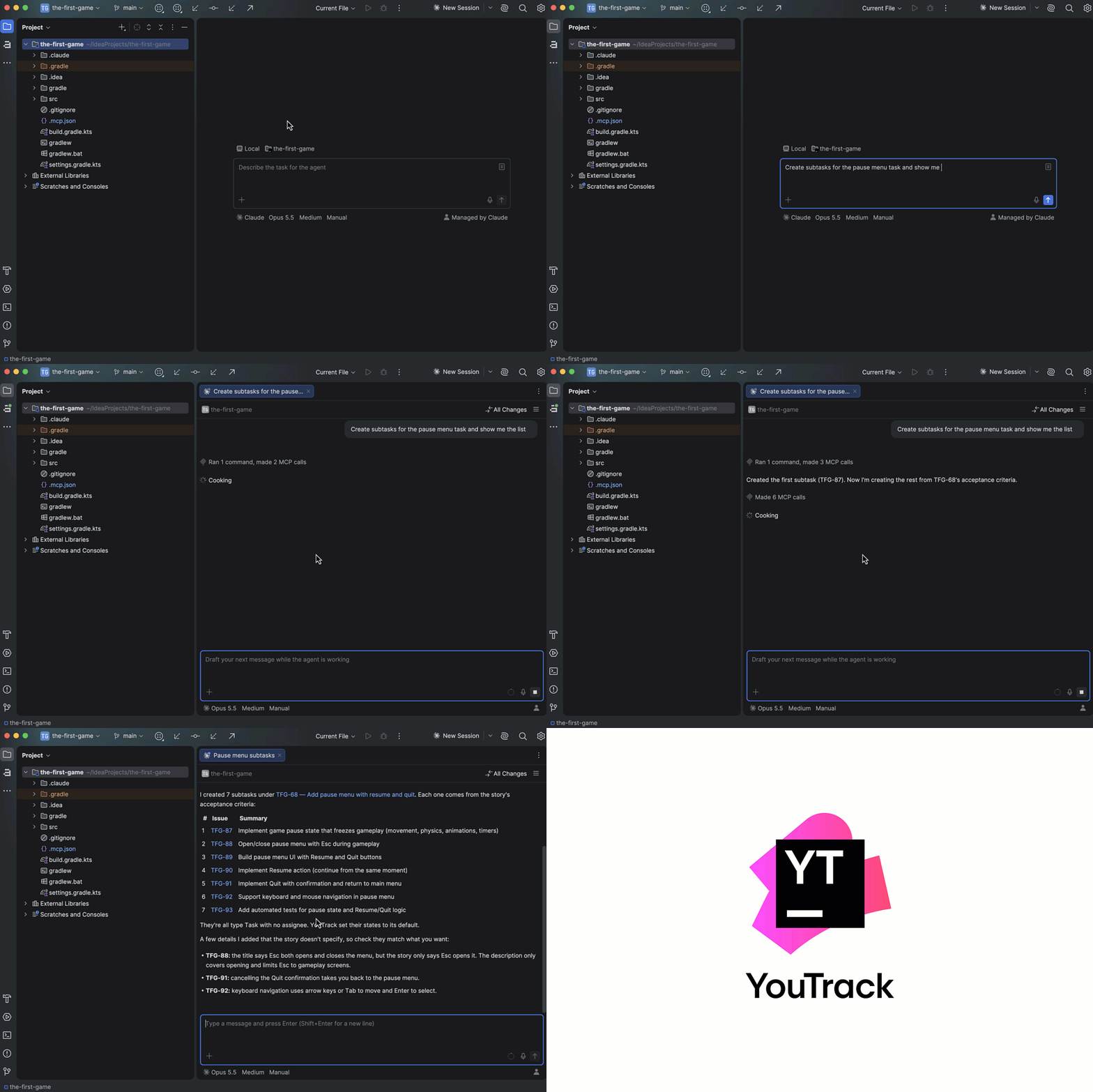
Delegating task management to coding agents is becoming a common practice, and for such teams, YouTrack evolves from automating individual processes to serving as a shared “agentic database” for agent and human-led tasks.
The Fullworks case study shows how a software company supporting 12 products, including Broadcaster, a messaging platform for UK trade businesses, has integrated agents throughout its software development lifecycle. The team connects Claude Code to YouTrack through MCP to manage development work directly from its coding tools. Its agents create and update tasks, verify release requirements, and help coordinate development across its products.
Automation platforms – n8n, Zapier, Make, OpenAI AgentKit, and others
If you rely on process automation on a platform of your choice, as a part of it, you can build agentic workflows that route requests, create and update tasks, log time, and trigger actions in YouTrack. Marketing teams, for example, can use the n8n integration to automatically turn budget requests submitted through a form into YouTrack tasks.

Beyond this example, you can integrate YouTrack into every step of your automation to update work items in response to actions from AI agents, share YouTrack content with other systems, and support a wide range of cross-tool workflows.
Workplace tools – service desks, internal portals, custom applications, and others
Your teams can work with project information through organization-level apps or internal AI assistants. You can add custom MCP actions with YouTrack apps or build automation using workflows and API-based scripts – in-house or with help from one of the YouTrack consulting partners.
This approach can scale to meet the needs of large enterprise customers. For example, Gurtam develops telematics and IoT platforms for B2B customers and operates in more than 160 countries. The team connected its internal AI platform, Nova, to YouTrack MCP. Managers and employees now use AI agents to create structured tasks, review feature requests, monitor backlogs, prepare changelogs, and turn meeting notes into actionable work.
Choose the right connection method
How you connect depends on what the tool supports. YouTrack supports OAuth authorization for compatible MCP clients, so users do not need to create or store permanent tokens. OAuth works with browser-based, desktop, and mobile AI applications, as well as shared organization-level services. You can also add YouTrack directly from the ChatGPT or Claude connector directory and set it up company-wide.
Simplify setup with CIMD
If an MCP client supports CIMD, a YouTrack administrator can allow it to register automatically. This removes most of the manual configuration and makes approved tools easier to connect.
Register an OAuth client manually
Manual registration is required when an application supports OAuth but not CIMD. This may apply to custom internal applications or AI clients that cannot register automatically.
Use a permanent token as a fallback
For local agents, custom scripts, and other tools without OAuth support, permanent-token authorization remains available. Tokens should be stored securely and are best suited to controlled local or custom integrations.
Option 2. Enhance efficiency with built-in AI assistance
The second option is our built-in AI Assistant that can handle routine work across YouTrack. Administrators have the option to manage access or disable AI entirely. Your data remains yours and is never used to train AI models, whether you choose YouTrack Cloud or Server.
Currently, AI Assistant includes a limited number of free credits, replenished weekly. It is available to YouTrack Cloud customers, including teams on the free plan, and to YouTrack Server customers using the free plan or an active paid subscription.
When Ask YouTrack and BYOK are introduced in Q4 2026, AI access will change:
- Free AI Assistant credits will be included only with paid YouTrack Cloud plans.
- Paid credits will be available through a connected JetBrains AI subscription to YouTrack Cloud and Server customers on free plans or with active paid subscriptions.
- BYOK will also be available to YouTrack Cloud and Server customers on free plans or with active paid subscriptions.
Text-to-issue transformation
Scan selected text for action items, choose which ones to turn into tasks, and create them together.
Writing assistance
Check grammar, spelling, and punctuation in tasks, articles, support tickets, and comments. Get phrase suggestions while writing in English or German.
The built-in YouTrack writing assistant is powered by JetBrains AI and will continue to run exclusively on JetBrains infrastructure.
Effortless summaries with AI
Generate concise summaries of project tasks, articles, and support tickets, regardless of the discussion length or language.
Reply suggestions
Generate context-aware replies, including general responses, apologies, or requests for more time. Use the suggested text as written or edit it before posting.
Text recognition from images
Extract editable and searchable text from screenshots, document photos, and other image attachments. YouTrack can also include images containing matching text in search results.
The text recognition feature doesn’t require a connection to external services. For YouTrack Cloud, processing takes place on JetBrains infrastructure, while for YouTrack Server, it runs within your local environment.
Coming soon: Ask YouTrack and BYOK
Ask YouTrack, a built-in agentic AI chat, is planned for Q4 2026. It works with your current YouTrack context: Search through prompts, ask it about your projects, get answers in chat, understand the state of work, create tasks, and propose updates for your review.
We plan to add BYOK (Bring Your Own Key) support, so you can connect your own AI providers and use the LLM of your choice – in line with your company’s policies and budget.

Coming soon: Task creation from Slack threads
For teams that use Slack for everyday collaboration, we also plan to add a new AI-powered feature available in the YouTrack Slack app in Q4 2026 that lets you create a task from a thread. You’ll be able to automatically turn a conversation in your team channel into a task, or add instructions along the way to specify what it should include.

Option 3. Experience high-quality project management without AI
YouTrack’s core functionality does not depend on AI. Administrators can disable AI features entirely. Teams with strict AI policies can plan projects, track tasks on Agile boards and Gantt charts, maintain documentation in the Knowledge Base, and manage customer or internal requests in Helpdesk – all without AI anywhere in their workflow.
Server or Cloud – your choice!
For greater control over your infrastructure and data, you can choose YouTrack Server. It scales to hundreds of thousands of users, supports GDPR and SOC 2 compliance, integrates with existing identity systems, and provides real-time monitoring.
YouTrack Cloud is hosted and maintained by JetBrains, with a choice of AWS regions in Northern California, Frankfurt, Ireland, and Singapore. Both versions offer the same functionality, with AI on your terms, whichever you choose.
Save up to 70% compared with Jira and Confluence
Whether or not you enable AI, YouTrack’s total cost of ownership can be up to 70% lower than Jira and Confluence combined, and that’s before Atlassian’s service management and plugin costs are added.
YouTrack is free for a team of up to 10 users. YouTrack Server subscriptions start at \$900 per year for 15 users, while YouTrack Cloud starts at \$4.50 per user per month for teams of 11 or more users.
YouTrack Helpdesk includes three support agents and unlimited reporters for free. Additional agents cost \$6 per agent per month.
If you have any other questions about AI in YouTrack or migration, please share them in the comments below or get in touch with our technical support. We’re always here to help.
Your YouTrack team
AI or no AI, Server or Cloud – you choose!