
MPS now uses IntelliJ Platform 2026.1, JDK 25, and Kotlin 2.3. Build Language gains transitive dependencies, migrations are more reproducible, and Java stubs have received a substantial quality update. The bundled Projectional Agent Toolkit plugin enables AI coding agents to read and write MPS models, thus opening up a number of cutting-edge development concepts for MPS developers and language authors.
What’s new
Here are the most noteworthy new features.
Projectional Agent Toolkit – AI coding agents can now work directly with MPS models
MPS ships with the Projectional Agent Toolkit, a plugin that exposes the MPS projection, model, and language workbench to AI coding agents through the Model Context Protocol. Agents such as Claude Code, OpenAI Codex, JetBrains Junie, and any other MCP-compatible client can connect to a running MPS instance and operate on it the way a developer would – navigating modules and models, reading and editing nodes through the projectional editor, resolving references, inspecting concept hierarchies, generating code, and running configurations. They no longer have to treat .mps files as opaque XML.
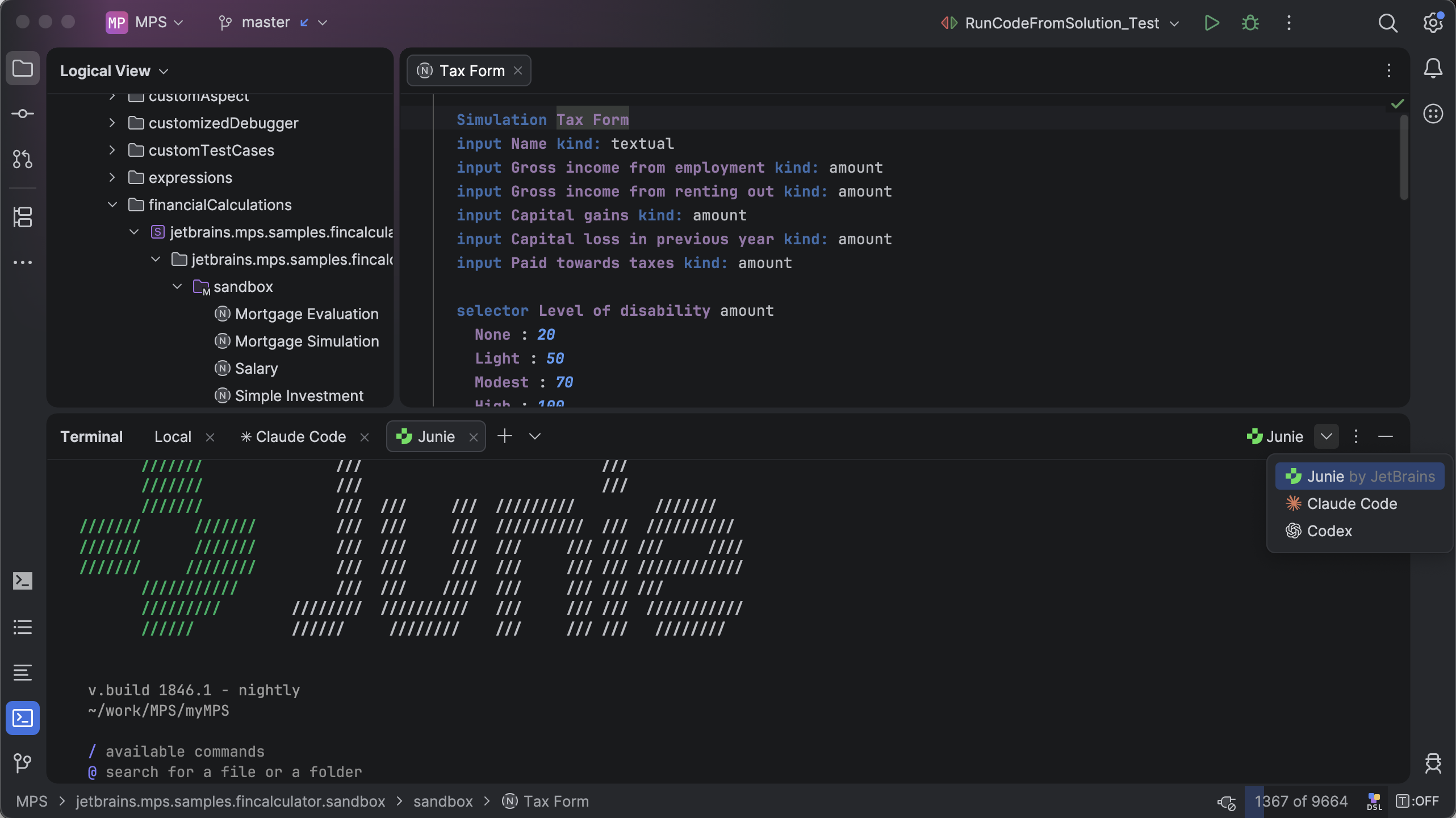
The Projectional Agent Toolkit contributes a dozen toolsets covering the full surface of an MPS project:
- Project, modules, and models – These make it possible for agents to enumerate solutions, languages, and devkits; open and create models; and resolve dependencies.
- Languages and concepts – These give agents the ability to inspect concept hierarchies, properties, children, references, and inheritance, as well as implement structure concepts from a JSON blueprint.
- Root nodes and nodes – These allow agents to read, create, update, move, and delete nodes through node-aware operations that respect concept constraints rather than text-level edits.
- References and scopes – These enable agents to query assignable targets for a reference link, so the agent picks a valid referent the first time.
- Run configurations – These give agents the ability to list and execute project run configurations to validate changes end to end.
To make sure agents become productive as quickly as possible, the toolkit also bundles a set of skills – focused, model-aware playbooks that ship with the tools. They teach the agent how MPS languages are organized, how to implement structure concepts, how to work with the editor, how to write BaseLanguage as a Json AST, and how to record DSL-specific memories for future sessions. Skills are discoverable through the same MCP channel, so a freshly connected agent can ask MPS what it should know before it starts editing.
The experience of working with various AI assistants in IntelliJ-based IDEs now extends naturally to language and DSL development: An agent can implement a new concept, wire up its editor and constraints, add behavior methods, create DSL code, regenerate it, and test and run the result – all while staying inside the MPS semantic model. For language designers, this transforms AI assistance from a code-completion convenience into a collaborator that understands projection.
The Projectional Agent Toolkit is an experimental feature and may be subject to API changes in the future. It is bundled and enabled by default. Just start the embedded MCP server and point your MCP-capable agent at the MPS instance; the toolsets and skills appear automatically.
Read the Projectional Agent Toolkit documentation for full details.
Migration to IntelliJ Platform 2026.1, JDK 25, and Kotlin 2.3
MPS 2026.1 completes the jump to the current generation of the IntelliJ Platform. The runtime is JDK 25, and the embedded Kotlin version is 2.3.0. Additionally, MPS now builds and ships its own kotlinx-metadata-klib / kotlin-metadata-jvm artifacts from the Kotlin repository with the matching 2.3.0 tag, restoring the KLib-based Kotlin stubs support that the last public kotlinx-metadata-klib:0.0.6 could no longer provide.
Ability to check ICheckedNamePolicy against specific natural languages
MPS now uses the IntelliJ Platform’s natural language support, provided by Grazie. This means you can check whether string values in instances of ICheckedNamePolicy, such as intentions, actions, or tools, have proper capitalization according to the rules of a specific natural language.
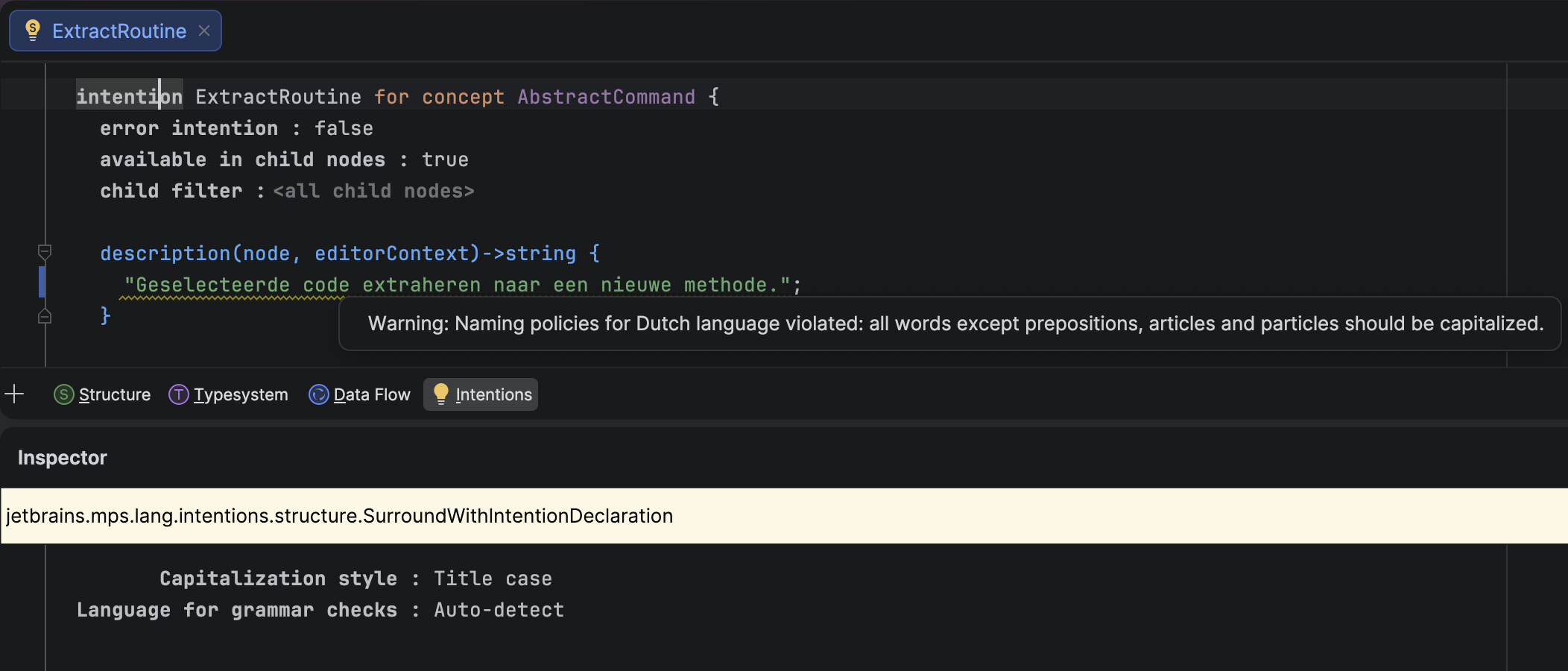
You can now install natural language support for your preferred languages into MPS, and the IDE will detect the language used in strings and verify that individual words are capitalized correctly. You can also bypass the language detection mechanism and specify your desired language explicitly.
In addition to the default Title-case capitalization rules, MPS offers three other options:
- Sentence-case, which follows the IntelliJ Platform’s rules.
- Inherited, which uses the capitalization rules of the closest ancestor
ICheckedNamePolicy. - No capitalization rules.
New boolean editor style: read-only-inspector
The new read-only-inspector style applies the read-only property on all editor cells in the inspector. When this style is applied to a cell in the main editor, the inspector becomes read-only for the inspected node when the cell with this style is selected. The new style has the following properties:
- It is disabled by default.
- The style is inheritable and overridable, just like the
read-onlystyle. - It has no effect on main editor cells.
- The
read-onlystyle set by this mechanism can be overridden in any cell farther down the inspector’s editor cell tree.
Transitive dependencies in Build Language
Build Language no longer requires every transitively reachable build script to be listed in dependencies. This means that a build script, BuildA, that depends on BuildB can now reach BuildC through BuildB — provided that BuildB depends on BuildC — without having to list BuildC explicitly. The generator emits ${artifacts.BuildC} Ant properties for such cases, and these properties can be supplied from the outer build tool, such as Gradle or Maven.
This lets you split large builds into smaller ones without forcing every user to update the dependency lists. For example, a single platform build script can wrap a growing set of external libraries used across sub-projects.
More reliable migrations via recorded dependencies
Migration code previously decided which migrations to apply based on the actual module dependencies and used languages collected at migration time, but it would read versions from the dependency snapshot recorded in the module descriptor. That mismatch could cause migrations to use a different view of the world than the one the module was last modified against.
In version 2026.1, the migration machinery consistently uses the dependencies and used languages recorded in the module descriptor at the moment of last modification, not the currently observable state. The migration checker was refactored accordingly. It now reuses information already collected for the migration process instead of recomputing it on demand.
Modernized project lifecycle
With MPSProject having moved from a legacy IntelliJ IDEA ProjectComponent to a project service, MPS-aware features need a reliable way to be notified about MPSProject becoming available and going away.
This version introduces a dedicated mechanism for managing MPSProject startup and shutdown activities, giving MPS control over the sequencing, grouping, ordering, and threading of those activities. This was something the platform’s ProjectActivity and MPSProjectActivity could not offer.
How it works: Implementors register against the jetbrains.mps.project.lifecycleListener extension point, declared in MPSCore.xml, via a ProjectLifecycleListener.Bean with a listenerClass and an optional integer priority. The LifecycleEventDispatch.java inside MPSProject can fire:
projectReady– non-blocking.projectDiscarded– blocking.asyncProjectClosed– non-blocking.
More new features…
Check out all the new functionality on the What’s New page.
New UI
The Classic UI plugin is disabled by default in this release and will no longer be supported in a future update. If you’re using the plugin, we recommend migrating to the new UI.
The full list of fixed issues can be found here.
Try the new features and let us know what you think.
The JetBrains MPS team