

With the last of the new smart trainer models out for the year, I figured it’s time for a new smart trainer recommendation guide. It’s been a hot minute since I last did one of these…and in some ways, that makes it kinda easier – as the market has both consolidated a bit, as well as simplified too.
In the past, there were a lot of different price brackets, as well as compromises to be made. But these days, there’s really only about 3.5 price brackets/ranges to be aware of. Life got simpler, yet concurrently the options within that got far better! On the whole, there’s very little difference in 2026/2027 between a $400 trainer and a $1,000 trainer. They’re astonishingly similar.
Keep in mind this guide is essentially focused on smart trainers. Specifically, ones that transmit some sort of ANT+ and/or Bluetooth Smart signal, and allow control of the trainer itself (via ANT+ FE-C and/or Bluetooth Smart FTMS). In other words: A company has to follow the well-recognized standards to even be considered for this list. That’s not really an issue anymore, but point is, I’m not really looking at non-smart trainers or rollers. I may add a quick addendum for smart bikes into this…we’ll see.
How I Make Trainer Recommendations:

First and foremost, I only recommend trainers I’ve actually used. It’s simply hard to judge things like accuracy or total ride feel unless I’ve got a unit in hand. And while one might think you can just look at a past similar trainer, my testing has shown that’s rarely the case. We can see that first-hand just last week with the Tacx Nera smart trainer being released yet falling short of other Tacx products.
In addition to me, my wife has ridden all of these trainers as well. Together we put in a lot of miles/kilometers on all of these units. And virtually all of them I’ve even ridden this year too, despite most of them being released earlier than that. I’m constantly rotating through trainers.
When I look at recommendations across all products I make, I try and recommend products to you in the same way that I’d do to friends and family. I keep it simple and explain exactly why I feel a given way. My goal is NOT to make a roundup of every trainer on the market. Though I will briefly discuss why I didn’t include some trainers in this piece at the end.
Trainer Price Ranges:

Over the last 3-5 years we’ve seen a dramatic decrease in smart trainer prices. Trainers that were once $1,200+ are now basically $400 trainers. Unlike some other industries, this actually isn’t a “race to the bottom”. Not at all. The units at $400 (like a Wahoo KICKR CORE 2 or JetBlack Victory) are legitimately incredibly good trainers that often beat $1,000 trainers. Economies of scale, learned manufacturing lessons, and technological components getting cheaper in certain areas is what’s driven this price down. As a reminder, the fundamental flywheel specs of the KICKR CORE 2 are identical to the highest-end trainers from just a few years ago. And in some cases these newer/cheaper trainers even have features the higher-end ones still don’t.
Budget Trainers – sub-$350: Look, there’s really only one trainer in this category from a mainstream brand, so carving this category out is basically just for this one trainer. But hey, it’ll make sense below.
Mainstream Trainers – $350-$600: This is the meat of the trainer market, and frankly what most people should buy. I made the price brackets this way, because some of the trainers in this category will normally sit at $500-$550, and then go on sale near-constantly for $400. Frankly, I’d basically consider them all $400 trainers, since that’s the price they tend to be at the majority of the time.
High-End Trainers – $600-$1,000: All of the major companies that make mainstream trainers also make high-end ones. In fact, most mainstream ones start off as high-end ones, and then a few years later end up less expensive. Just like most other tech products.
Super High End – $1,000+: Just like the budget category is essentially carved out for a single product, so is this ‘super high end’ category. Mostly because the other products that were in here left the building, dropped their price, and ended up sub-$1,000. Plus, it felt weird including a $1,400-$1,600 trainer in the same price bracket as a $675 trainer…even if they are pretty darn similar.
As is probably obvious, these categories are based on USD pricing. The EUR pricing tends to be pretty similar to be honest, though due to no MAP (minimum advertised price) in Europe, you’ll get some more variations at the upper end of the price ranges, because retailers will yolo a bit and reduce prices as they see fit, especially on Tacx and Elite trainers. So if you’re in Europe, you might get yourself a Tacx NEO 2T for even less than my price brackets. Win for you!
Finally, I’ve tried to include a bit of both official retail pricing, as well as reality/street/sale pricing. I’m sure that’ll upset some of the companies, but I don’t really care. I know what these trainers actually sell for most of the year, and that’s the price I’m mostly looking at. For example, Elite lists the Justo 2 at 1,125EUR, but it’s virtually always sold sub-1,000EUR. Just like the Wahoo KICKR CORE 2 is near-constantly on sale for $400-$500. So I’ve accounted for that in my recommendations, ok?
The Main Tech Areas to Consider:

When it comes to smart trainers, again, things have very much consolidated in terms of tech. Still, there are some key differences that will essentially drive how much you pay. Here are the main things that are different between the trainers:
Max Incline/Gradient & Max Resistance (Watts): These are the big two, and they’re basically linked together. In other words, how much resistance can the trainer provide, in terms of simulating a given gradient (e.g. 8%, 16%, etc…climbs). Meanwhile, the maximum wattage for most of these tends to be in the 2,000w ballpark, which is well beyond what most people are capable of. Even most Tour de France pros can’t hit 2,000w, usually the sprinters might briefly. Unless you know you can hit over even 1,000w…you can’t. I promise you. Meanwhile, for max incline, remember that almost nobody actually likes riding grades above 16%. It’s just a wall of grinding at that point. But, if you are the kind that likes to suffer on 20-25% inclines…then the upper tier trainers are what you want.
Movement: This is the next main category that’s been defining smart trainers the last few years. Specifically, slight side-to-side movement using some sort of cushioning /flexible/squishy feet. Some folks will buy so-called ‘Rocker plates’ that allow you to put any trainer on it, and get even more tilting movement. The idea with all this movement is that even a slight bit (a centimeter of body movement) dramatically increases how long you can spend comfortably on an indoor trainer (e.g. 3-5 hour rides in the winter). For the most part, all of the top-tier trainers now include some sort of cushioning feet, and frankly, they’re all pretty similar (especially if you put them on a trainer mat).
Meanwhile, for things that aren’t really as much of a factor these days (or a factor at all), I just want to quickly list these off:
Accuracy: As amazing/odd as it may seem, the reality is these trainers are all nearly identical now in this department. Sure, they have claims that the lower-end trainers are less capable and the higher-end trainers are more capable, but with the exception of the Tacx NEO 3M (super high accuracy), all of these trainers actually test basically the same. They all claim +/-1 or +/-2%, yet they all perform basically the same in real-world testing (sometimes within that spec, and sometimes just outside of that spec). The only reason the companies list these two spec options (1% or 2%) is that certain pro levels of eRacing require +/- 1% trainers, and by doing so they can force you to buy a higher-end unit. In reality, there’s zero standard for testing this by the industry. Right now, this is purely a marketing play…as these companies themselves have told me in meetings.
Protocols: All trainers support everything these days. That includes ANT+, Bluetooth, WiFi, and all the variants of that. Though, ANT+ is slowly being phased out on some units, given ANT+ has shut down.
Bike Axle Compatibility: Look, this isn’t really an issue these days. All of these trainers support both quick-release skewer and thru-axle adapters, including for both road and mountain bikes (and gravel). Cargo bikes remain a challenge to put on smart trainers.
Cassette types: All of these trainers support virtually all cassette speeds (e.g. 9-13 speed cassettes and the Zwift Cog). Some do require adapters for certain types (such as XDR), but those are easy enough to get from the company.
Direct Drive vs Wheel-On Trainer: Simply put, there’s zero reason to buy a wheel-on trainer these days. Direct drive trainers (where you remove your rear wheel) is far better, as it removes any slippage/slip/etc issues, and also is far more accurate. Buying a wheel-on trainer would be like purchasing a dial-up modem.
Got all that? Good. Let’s get into one last area before the recommendations.
Zwift Cog or Mechanical:

Ok, so the last thing we need to quickly cover is whether or not to get your trainer with the Zwift Cog/Click. The Zwift Cog is simply a replacement for a cassette on your trainer, which makes it compatible with *any* bike you put on there. Versus a regular cassette, you have to match the cassette speed of your bike (e.g. 11 speed for 11 speed bikes, 12 speed for 12 speed bikes, and so on).
The Zwift Cog has zero electronics on it. Instead, the shifting happens via the Zwift Click buttons you put on your handlebar that connect to Zwift and ‘virtually’ shift within a set of ‘virtual gears’. The only downside? Officially, this only works with Zwift. And also Rouvy, because Zwift bought Rouvy. Both: if you want to use one of a gazillion other trainer apps, you simply can’t use the Zwift Cog/Click, because you can’t shift. There are other apps that have reverse engineered the Zwift Cog/Click, and they do work…until they don’t because Zwift changes it to break. Said differently, buyer beware.
The only exception to that is for ERG mode app (which are structured workouts), because no shifting is required. In which case it doesn’t matter which cassette type you use, the trainer simply changes resistance to whatever the wattage you set in the workout (e.g. 250w) – and you never shift.

So what’s my recommendation? Well, it’s kinda simple. If you have multiple bikes with different cassette types and you use Zwift, then go with the Zwift Cog. Whereas if you don’t use Zwift, definitely don’t go with the Zwift Cog. What about if you have a single bike and use Zwift? Honestly, I prefer the mechanical cassette because I actually enjoy the realism of shifting on my bike. But conversely, some people prefer just tapping a rubber button. To each their own.
You can always change your mind later. The Zwift Cog/Click set is about $50 normally, and likewise, a cheap cassette for a trainer floats in the $50-$75 range. Swapping between them takes 2-3 minutes. So it’s hardly a permanent sentence one way or the other.
Budget Recommendation:

There’s really only one option that fits in this bucket, which is the Decathlon D100 smart trainer. It is essentially just a rebranded Magene T110 smart trainer. Magene makes many trainers that are sold under different brand names. But in this case, the Decathlon Van Rysel D100 is the one I bought multiple units of and tested extensively.
The trainer floats in the 250EUR price ballpark, though will drop down to roughly 200EUR around big sale events such as Black Friday.
The D100 has a maximum resistance of 600w, which is lower than all the other trainers by a fair margin. But equally, if you’re doing mostly structured workouts, and don’t tend to do any Zwift Racing, this is more than enough for most people. Both my wife and I had no problems using this trainer for structured workouts, because you simply aren’t doing structured workouts at anywhere near these wattage levels (or, most people aren’t anyway).
It also has a 6% maximum grade simulation, which is less than half what most other trainers have. But again, most people leave their ‘Trainer Difficulty’ setting to 50%, which means that 12% climb gets halved to 6% anyway. Still, climbs won’t feel as good as other trainers.
There are also a few other compromises to be made…but again, at 200-250EUR, it’s an excellent option, especially if/when the other mainstream trainers aren’t on sale and the price gap is 2.5-3x up to those units, versus perhaps just an extra 150EUR.
Again, check out my full in-depth review for all the pros and cons there, but on the whole its great to see options like this in the market.
Mainstream Recommendation:

Next up we’ve got what used to be titled the ‘budget’ bucket in terms of price ranges, but these days it has become the mainstream price to buy a smart trainer. This bucket ranges from $400 (well, $399 I suppose) to about $600. That’s specifically to cover the trainers when they are on sale at $399 like they are now, and then the regular retail price at roughly $500-$550ish. Either way, they’re strong buys. But especially strong when they’re at $399 as they very often are.
My two very strong recommendations here are:
– JetBlack Victory: Officially priced at $449, but frequently on sale to $399
– Wahoo KICKR CORE 2: Officially priced at $549, but frequently on sale to $399
These two trainers are so frequently on sale they probably spend more time on sale than not. Both were designed and manufactured to operate on price margins that support the $399 price point. Certainly, I think both are worth buying above that price point, but it’s not hard to wait briefly to find it back at $399.
Wahoo sells the CORE 2 in both Zwift Cog & mechanical cassette versions. Whereas JetBlack currently on sells it with Zwift Cog, though you can easily remove/swap it for a mechanical cassette if you want.

Both of these trainers have nearly identical specs:
– Stated Accuracy: Both +/- 2.0%
– Max Gradient/Incline: Both at 16%
– Max Resistance: Both 1,800w
– Protocol Compatibility: Both ANT+ FE-C, ANT+ Power, Bluetooth Smart Trainer Control, Bluetooth Smart Power (everything you need), Direct Connect WiFi, Zwift Protocol
– WiFi Connectivity: Both included
– Heart Rate Bridging: Yes, both
– Zwift Race Mode: Yes, 10Hz
– Zwift Ride Frame Compatible: Yes, both.
– Sound/Noise: Virtually silent for both
– Max Rider Weight: 250lbs/113kg for KICKR CORE 2, and 265lbs/120KG for JetBlack Victory
– Flexible Feet for Motion/Sway: Nope, neither
– Handle to grab onto: JetBlack Victory only; no handle on Wahoo CORE 2.
– Flywheel weights: 4.7KG for JetBlack Victory, and 5.4KG for Wahoo CORE 2.
The key difference here is that the Wahoo KICKR CORE 2 can also connect with the Wahoo KICKR CLIMB, in the event you want to spend another $600-$700 for the front of your bike to go up and down. If you have no plans to ever buy that, then you can ignore that piece.
Both are fantastic trainers and would be my go-to recommendation for 95% of people out there.
High-End Recommendation:

These three units are all about delivering a bit of movement with a bit more inertial feel. Frankly, it’s as simple as that. Ironically, all three of these units are actually older than the less expensive ‘Mainstream’ ones listed above. And by extension, that’s why the units you see above are just so darn good that the marginal gains seen here are pretty…minimal for most folks.
I’ve got three recommendations here:
– Elite Justo 2: Officially retails for $1,125, but floats in the 700EUR-900EUR range (mostly in Europe)
– Tacx NEO 2T: Officially retails for $1,099, but floats in the $800-$900 range on sale right now
– Wahoo KICKR V6: Officially retails for $849, but floats down to $675 on sale right now
It’s funny, all three of these trainers actually use notably different technology in terms of how they provide resistance. The Tacx NEO 2T is probably the most ‘high-end’ in terms of its resistance mechanism, though, like a political subject people debate between the Wahoo KICKR and Tacx NEO series in terms of which ‘road feel’ type they prefer. Personally, I suspect most people wouldn’t be able to tell blindfolded. Meanwhile, the Elite Justo 2 has some extra features that are kinda unique, such as the ability to link up to Shimano Di2, as well as a pre-installed 12-speed cassette (the others only offer pre-installed 11-speed cassettes).

All three trainers offer compatibility with their companies’ respective gradient simulators. So the KICKR V6 connects to the KICKR CLIMB, the Elite Justo 2 connects to the Elite Rizer, and the Tacx NEO 2T connects to the Tacx Alpine. And all three companies offer both Zwift Cog & mechanical cassette versions.

Ride feel is pretty darn similar across all three of them, and all three also have very real-world/tested similar accuracy between them.
Here’s the key spec notes/differences:
– Stated Accuracy: All at +/- 1%
– Max Gradient/Incline: Wahoo KICKR V6 at 20%, Elite Justo 2 at 24%, Tacx NEO 2T at 25%
– Max Resistance: Wahoo & Tacx at 2,200w, Elite at 2,300w
– Protocol Compatibility: Both ANT+ FE-C, ANT+ Power, Bluetooth Smart Trainer Control, Bluetooth Smart Power (everything you need), Zwift Protocol
– WiFi Connectivity: Wahoo & Elite both have WiFi, but Tacx NEO 2T does not.
– Heart Rate Bridging: Only Elite Justo 2 has this
– Zwift Race Mode: Yes, 10Hz
– Zwift Ride Frame Compatible: Yes, all units
– Sound/Noise: Virtually silent for both
– Flexible Feet for Motion/Sway: Elite & Wahoo have squishy feet, Tacx doesn’t in box, but can get ’NEO Motion Plates’
– Downhill Drive Simulation: Only Tacx NEO 2T
– Road feel simulation (cobblestones/terrain/etc…): Only Tacx NEO 2T
– Operate without power cord/plugged in: Only Tacx NEO 2T fully, Elite Justo 2 with no control
As you can see, there are a few features that differ here. The Tacx NEO 2T has some extra road feel-ish simulation features, but then lacks the built-in WiFi and squishy feet of the Wahoo/Elite trainers. You can get the Tacx Motion Plates for forward/back movement on the Tacx NEO 2T, which are often bundled in sale prices. But that doesn’t give you much left/right movement. Again, trade-offs between the units here.
I’d honestly be happy with any of the three units – I don’t really have any significant preferences here.
Ultra-High End Recommendation:

This is probably the easiest category, since there’s really only one entrant left. Wahoo discontinued the Wahoo KICKR MOVE earlier this year, thus leaving only the Tacx NEO 3M (here was a comparison I did from way-back-when). Both trainers’ key feature was that they had multi-in front/back movement (essentially they roll forward/back on a small track under the trainer).
Leaving just the Tacx NEO 3M in this category, beyond the rolling momvement piece, its claim to fame is (easily) being the most accurate smart trainer on the market. Nothing really comes close to the dependability of this trainer from an accuracy standpoint, and likewise, just how good the ERG mode (structured workout mode) is from a steadiness standpoint. It’s really really good.
The downside to the Tacx NEO 3M is that Garmin/Tacx didn’t include WiFi in it. You have to buy a silly adapter for it. Of course, most people are perfectly happy just using Bluetooth and ANT+, which is built-in. But it’s still a dumb decision not to include it, especially at this price point.
As for the movement, it’s a nice touch, especially for longer structured workouts, or steady-state workouts. I don’t tend to find forward/back track movement like that great for hard sprints (on any trainer/platform), as you end up quickly hitting the limit of the track. But otherwise it’s a nice touch. Like the NEO 2T, it uses a magnetic flywheel system that has a slate of magnets inside the flywheel, which allows for things like downhill drive, road feel simulation (such as cobblestones), and downhill drive.
In terms of specs, it does go beyond the high-end trainers in a few areas; though, it is lacking Zwift Ride frame compatibility and lack of built-in WiFi. On the flip side, the NEO series is known for not needing any power cord.
– Stated Accuracy: Up to +/- 1%
– Max Gradient/Incline: Up to 25% incline
– Downhill drive: Yes, simulate going downhill (as if your being pushed downhill by gravity)
– Road feel simulation: Yes, certain terrain types like cobblestones, bridge planks, etc…
– Max Resistance: 2,200w
– Zwift Ride Frame Compatible: Nope
– Requires power cable to ride: No, can be used without power
– Max Rider Weight: 275lbs/125kg
For most people, the Tacx NEO 3M is complete overkill. It is however super handy for power meter testing though…for someone like me. Only real downside is the price and lack of WiFi.
The Why I Didn’t Include It List:

It’s not that these trainers are bad (ok, some of them are), but rather, they just don’t fit or don’t provide enough value in comparison to the ones above. There are certain times where the other trainers make
Elite Avanti: The Avanti did absolutely nothing wrong, except be in the pricing no-man’s-land. When Avanti launched, it aimed to undercut the pricing of the high-end trainers by being close on specs, but a bit under on pricing. The problem was that a mere 3 hours after it launched, JetBlack announced the Victory, which was half the price and nearly identical specs. A classic example of the right unit, just the wrong time and place.
Elite Rivo: Like the Avanti, this is actually a good trainer. The problem is that at the $400-$600 price point, the KICKR CORE 2 and JetBlack Victory are better trainers. In fact, I actually rode the Elite Rivo almost all last winter as my main trainer. It’s perfectly fine, but doesn’t tend to make it down to that $400 price point that the others are nearly always at. Atop that, it’s not widely available outside of Europe (in fact, nearly impossible to find in North America).
Magene trainers: Two reasons: first, I simply haven’t put miles on recent Magene trainers. And the second being distribution/availability varies quite a bit globally. They tend to be widely available in Asia, somewhat Europe, and less-so in the US. Either way, Magene makes good trainers on the whole. The Decathlon D100 I recommend above is simply a rebranded Magene T110. And Wahoo? Magene helps manufacture some of their trainers as well. Magene is well known in the industry…but again, I haven’t tested all their recent models myself to make an informed recommendation.
Tacx Flux: This is a super old trainer these days that lacks things like Zwift Cog support; it’s rather loud by today’s standards, clunky, and generally a bad idea to buy. I’d happily take a Decathlon D100 over this any day.
Tacx Nera: Having just published my review on it last week, this trainer needs some more time baking in the oven. The accuracy drift is too high, and especially combined with the price.
Wahoo KICKR ROLLR: Look, I don’t have an issue with this unit in bike fitting environments/studios. Go forth, it’s great of that! But as a regular smart trainer? Nah. You need a power meter with it in order to be accurate. So while it might seem like an interesting choice, given the power situation its definitely not my pick for regular riding. Whereas for doing bike fits and the like, it’s awesome.
Wahoo KICKR MOVE: Simply put, they discontinued this trainer last summer or so for reasons that aren’t clear to me. Thus I can’t recommend something that doesn’t exist anymore.
Wrap-Up:

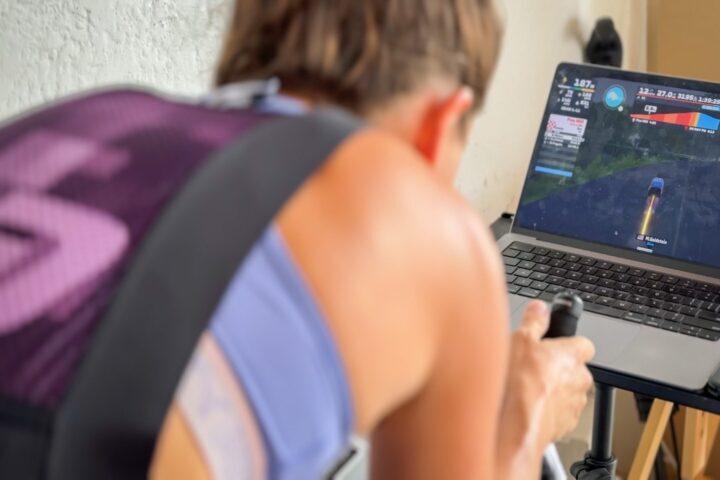
Here’s the thing when it comes to trainers – virtually everything these days above $400 is a perfectly good trainer. In the above image, I’m riding the Elite Rivo smart trainer, which didn’t make the cut above, mostly due to the pricing/availability side. Yet here I was last winter riding a structured Zwift workout, with Philips Hue lights linked to my power output in real time via WiFi. And all for a trainer that floats well into the mainstream pricing and specs bucket.
The point being, you can spend more money and get more features. Buying into the higher-end pricing buckets isn’t wasted money at all; it’s just not necessary for most folks either. As cycling has continued to get more and more expensive, I just want to be really clear on that.
Sure, when you jump up to a Wahoo KICKR V6 or a Tacx NEO 3M, you can absolutely feel the difference if you ride enough. The flywheel inertia is better, and in the case of the NEO 3M, you’ll get that little bit of forward/back movement too. All that’s true.
But of course, it’s up to you to decide whether or not it’s worth the extra cash. The good news is, this time of year is the best time of year to make that decision. All the trainers are out/released, and they’re all on sale. Especially this week. It doesn’t get any better than the next 7 days.
With that, thanks for reading!