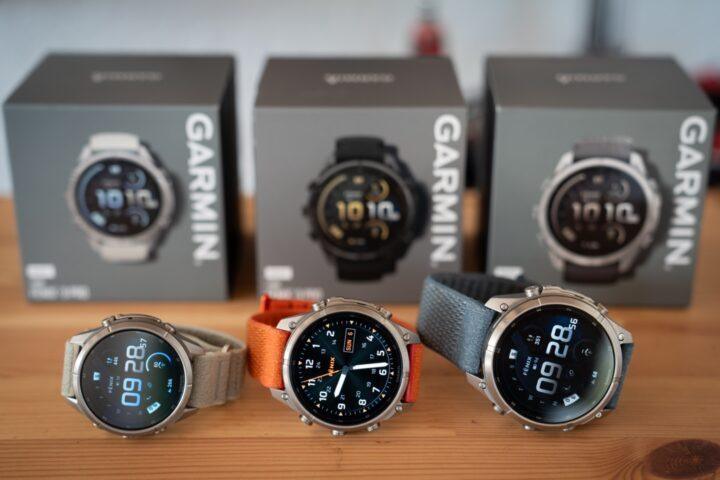
COROS has just announced the new COROS Vertix 4, which takes all of the hardware innovations that COROS has implemented in various watches over the last 18 months (e.g. new HR sensor, microphones, speaker, action button, etc…), and rolled it into a larger Vertix unit. But atop that, the company has added an LED flashlight to the side, as well as the ability to download satellite imagery onto the watch (in addition to traditional topographic style maps). Of course, there’s a bunch of other features as well that come with the newer hardware package. Oh, and yes, it’s now an AMOLED display.
I’ve been putting the COROS Vertix 4 through its paces over the last little bit, seeing where things work well…and where they fall short – just like usual.
With that, let’s dive straight into the newness.
Lastly, this is a media loaner from COROS. I’ll soon order my own unit for long-term usage/comparison/testing purposes. As always, I don’t accept advertising from any company I review, and no company sees my reviews before you do. So, if you found this review useful, consider becoming a DCR Supporter, which gets you an ad-free site, plus the behind-the-scenes video series between both myself and my wife on everything that happens in the DCR Sports Tech Cave/universe.
What’s New:

It’s been 2.5 years since the last COROS Vertix series device was released (the Vertix 2S), but realistically we’re talking almost 5 years since a major update (the Vertix 2). The Vertix 2S was essentially just an update of the heart rate sensor and GPS antenna. And by ‘essentially just’, I mean that was literally it. They also decreased battery life at the time, and it became chubbier, as a result of those GPS/antenna changes.
Since then, though, COROS has released an incredible number of new watches, all of them lower tier but ultimately mostly more capable. This includes the COROS Pace 4, Pace 4 Pro, Nomad, and Apex 4 (in two sizes). And each of those watches layered in new hardware features, like a proper speaker, or a microphone, or an action button, or a depth gauge that doesn’t track depth, increased storage, and so on.
By the time the Vertix 4 has come along, its sole job in life is simply consolidating all these new things into a beefier Vertix-sized watch and calling it macaroni. And that’s aside from all the new software features the Vertix 2S mostly got along the way. So I’m gonna skip those things, since everyone already has them. Make sense?
– Switched from MIP display to 1.47” LTPO AMOLED display at 3,500 nits (466x466px)
– Maintained sapphire glass on display
– Added LED flashlight (white) on right side
– Moved the Digital Crown to the upper right (from center right)
– Upgraded to the latest COROS 4th gen optical HR sensor package
– Added Speaker (for voice calls & audio alerts)
– Added new ‘Action’ button (customizable extra button…sorta)
– Added dual-microphone with voice pins/notes feature
– Added ability to take phone calls (with phone nearby)
– Added voice control from watch
– Adding downloadable satellite maps onto watch (coming in 2027)
– Added new multi-data page field that can cram in 13 data fields
– Added street & trail names to the offline maps
– Added POI database to offline maps
– Added depth gauge sensor (very limited though)
– Upgraded internal processor
– Increased storage to 64GB (from 32GB)
– Increased battery claim from 43 hours to 48 hours (multiband, always-on display), but decreased all-systems GPS from 73 hours to 58 hours (always-on display)
– Unit weight is 60g (or 68g with Nylon strap)
– Switched from 26mm band to 24mm bands
– Case size is a 49mm case
– Decreased thickness by 14% to 13.8mm
– Final box includes two watch bands, Nylon and regular silicone band
– Increased price from $699 to $799
One interesting quirk, the new Vertix 4 doesn’t have the newer satellite ‘Auto’ modes that the Pace 4 Pro has. It just has the forced multi-band (Max), all systems (High), and GPS only modes (Standard). Speaking of which, here’s those battery claims. More about reality later on…

Also, as noted earlier, the box includes two bands in each box. For whatever reason, the media loaner units sent out to reviewers didn’t include two bands, just a single band.

Finally, the Vertix 4 announces today, but won’t be available to order until…checks notes…Black Friday (November 27th). Yes, for real, COROS is actually launching a new watch on Black Friday. I can’t make this stuff up. More about that later.
The Basics:

In this section, I’ll walk through all the daily usage/basics of the watch, from the buttons to the user interface, to activity tracking, voice control, and more. Whereas in the next section I’ll get into the sports bits.
First up are the buttons: the Vertix 4 has shifted the Digital Crown to the upper right corner (from the right-center), to make room for the flashlight. Meanwhile, it’s gained an ‘Action’ button on the lower left side, like other recent COROS watches. This is still, in total, just three buttons (the Vertix 2S had three buttons on the right, including the Digital Crown):

As I’ve noted in past recent COROS reviews, while COROS might have had good intentions with the action button, in reality they never bothered to finish the code for it. So it does very little and isn’t really customized, especially in sports modes. More on that later.
One minor note is that they changed the strap release design on the Vertix 4. Aside from decreasing the band/strap from 26mm to 24mm, they also shifted to the industry-standard strap quick-release system. This has pros and cons. The previous design allowed for quickly removing straps and was more secure. The newer design allows for broad compatibility with anything on Amazon, but is less secure and a tiny bit fiddly.

Above are the two side by side, Vertix 2S on the left, and Vertix 4 on the right. Again, hardly a big deal to me, but I figured I’d mention the trade-offs.
In any event, back on the front is the watch face. COROS does have a good selection of watch faces, especially via their app, including plenty of creative ones tied to races, seasonal bits, etc… In this case, you can press the lower right corner on this stock watch face to iterate through a few different stats from the day.
Scrolling down from there are the widgets. The first smaller bit of information lets you open it up to more detailed bits about that topic (such as steps, sleep, training history, weather, etc…). You can lightly customize the order and selection of widgets here, roughly on par with Suunto, maybe a smidge more.


One of them being sleep, of course. In looking at the sleep tracking here, things have aligned well with the other wearables I’ve been using during this time period – including an Apple Watch Ultra 4 on the other wrist, as well as a Whoop 5.0, Garmin Cirqa, and Fitbit Air on the biceps.


As always, for sleep tracking I’m specifically focused on the times it shows I went to sleep and woke up. I don’t find much value in trying to compare sleep phases/stages, because the so-called ‘gold standard’ technological options to do so simply aren’t that accurate (only in the mid-80% range). Thus, pretending to compare sleep stages/phases is nothing more than bro science at this point, unfortunately.
In any event, all these things are visible not only on the watch, but of course the COROS smartphone app as well. You can see your current day stats on the main dashboard, and then dive into other stats and historical data pretty easily.


The app is simple to use, which COROS has long said is their mantra. As always, there’s a balance between being simple to use and depth of data. The reality is that the more data you get/store/etc., the more complex the app will become. COROS records a relatively small amount of daily health data (or even fitness metrics) compared to some of their competitors; thus the app is relatively straightforward still.
Shifting topics to some smartwatch features, there’s the ability to see smart notifications on the watch. You can’t respond to them, but you can at least see them and clear them. Likewise, there are media controls for bits on your phone, though I find this kinda finicky where sometimes it doesn’t see your phone’s media and sometimes it does. Here’s a moment where it decided to be happy:

Further, one of the newer COROS features is the ability to do voice control. This requires holding the lower left button, and then speaking your request. At which point the watch goes off and tries to fulfill your wish. This works reasonably well when not moving, though like the COROS Dura 2, falls apart at bicycle speeds. Still, most people on a watch will be doing this while standing still or walking, so that’s fine.


Though there are quirks, for example, you can’t ask it what time sunset is during a workout, since that falls into the ‘general use’ questions, and only ‘workout’ questions are permitted during workout time. I’m not kidding. Note that this is different than a full voice assistant that you might see on other smart watches where it can answer tasks/questions off to the internet. Instead, this is specific to performing actions on the watch itself. That’s fine though, I rarely care to talk to my wrist anyway.
With that, let’s illuminate the new flashlight before getting into sports modes.
The Flashlight:

There’s no doubt the flashlight on the Vertix 4 will be controversial. Even COROS themselves acknowledge this during their media briefing, and then went onto to spend half the presentation with an engineering dissertation into why they are right. Or rather, why their flashlight is on the right.
You see, up till now all smartwatch flashlights (including Inspector Gadget) were on the front of the watch (the 12 o’clock position). That had both benefits and drawbacks. The main benefit is that it worked for both left- and right-handed folks (regardless of the assumption that you tend to wear your watch on the opposite wrist to your dominant hand). The other benefit is that the back of your hand didn’t block the light being emitted.
The downside though, was that it meant depending on what you were doing, you weren’t actually facing the light towards the subject area your hands might be working with. For example, finding something in a bag, changing a diaper, or eating ice cream. COROS had been pondering this for a while. It was at least at year or so ago that they first approached me with my thoughts on the topic. Which, in case you’re wondering, were roughly “just follow everyone else, people are pretty happy with that”. The risk as I saw it, was that you both alienated left-handed people (since the light was either facing the wrong way, or you had to flip the watch, so that button usability wasn’t really ideal), as well as potentially left yourself with a light that might work for one task, but not another.
Anyway, fast forward to the final decision and enough schematics to build a fighter jet:

And more:

I’m not done yet. Or rather, they aren’t. Here’s more:

So what about real life? I’d say it’s growing on me. I think it depends on the task. For hand-focused tasks as outlined above, the side position generally works better than the 12 o’clock position, for me as a right-handed person.

Whereas for area illumination tasks, it still feels a bit weird and forced – since you have to basically point your arm/wrist at where you want to go, forcing it out away from your body. But that could also be years of using flashlights the other way. Shrug.

For walking on a trail at night, that’s halfies. Neither Garmin’s or COROS’s implementation is great orientation-wise, since your arm stroke essentially means both would be required to cover the ground.

As for running, just with Garmin’s, neither light has enough throw to make it work well on uneven/technical trails. It works fine at lower speeds, or if you were on a ‘trusted’ path where random rocks weren’t going to be there. But for all smartwatch lights, once I get up to speed, I quickly ‘outrun’ the light. The camera here makes it seem quite bright, in reality it’s both a very small area relative to my running speed and not as bright as the camera makes it seem.

Now, when it comes to turning it on, you’ll quickly double-press the lower left button – just like with Garmin. You can adjust brightness level on the watch using either the touchscreen or the digital crown. There are three white brightness levels. There is no red (or green) LED option here.

Then naturally, just like with Garmin, you’ll quickly double-press the same button again to turn off. Oh, wait…you mean that actually now goes into emergency SOS mode at night in the bed? Or flashing mode. Hmm…never mind.

Instead, we now tap the upper right button to turn it off. Plus the back buttons to get yourself back to whatever you were doing (watch face, widgets, workout/etc…)
Point being, If you tap the lower left button, it iterates between solid on and SOS and flashing. While I get the idea of putting SOS/flashing here, this just seems weird. Nobody needs either on the daily during day-to-day actions, so having it be prominent just means accidentally flashing (or SOS’ing) your friends and family constantly. Or flashing yourself. And again, it means switching back and forth between buttons unnecessarily. It’s just a haphazard UI.
COROS says the flashlight can stay on for many hours without killing the battery. They also say it won’t turn off after a set time, since they noted that “if you turned it on, you probably wanted it on”. And that’s true to an extent. We’ve all seen someone in daytime with a flashlight accidentally turned on, so turning it off after a long time (like 30 minutes) does have some benefits (rightly or wrongly). Plus, as I’ll talk about in a second, I actually used the near-30-minute bit last night.

That said, there’s one big gap today – which is trying to turn on the flashlight during a workout. The regular button triggers don’t work here, and instead you have to first long-hold the lower right button, then rotate around a bunch til you find the flashlight, then turn it on. Then back out to the sports pages you were on. And then finally, do the whole thing in reverse to turn it off.
What’s baffling here is COROS literally has an ‘Action Button’ they added 18 months ago to the COROS NOMAD. But as I noted then, it was half-baked and could not actually be assigned any custom action. I’m not kidding. Here we are now 1.5 years later, and the only action during a sport mode you can assign is whether to toggle to maps or compass. In between then and now, they’ve rolled out the action button that doesn’t do anything to all their other watches, yet…still haven’t fixed the software underneath to actually make it useful. C’mon COROS, stop being lazy. It’s infuriating how bad this is. Assigning existing shortcut functions is literally the easiest code thing you should be able to do here. You should have a vast list of shortcuts, just like your competitors do.
Now, that said, on my ride just last night I started far later than I expected, and thus the last 30 minutes were solidly past sunset. I had a rear taillight/radar, but didn’t have a front light. So, I used the Vertix 4 flashlight. When holding on the handlebars, it did a so-so job at lighting up the road in front of me at lower speeds (10-20KPH), though was mostly useless at higher speeds (e.g. 30-40KPH). But it did one thing super well: Let cars know I was there.

The wrist, while holding on to the handlebars, ends up bending to block much of the light you’d need in front of you (as you can see above, there’s no car behind me), but it still lets oncoming vehicles you easily spot the light. So that was a strong win.
Note that COROS doesn’t have any of the other modes that Garmin and Amazfit have around automatic after-sunset light enablement in running, or any of the cadence lock while running, etc… I don’t really consider those a dealbreaker or such, but they would be handy to have.
Overall, from a hardware/position standpoint, I’m pretty happy with the flashlight. While I think it’d be nice to have the secondary red light, I don’t miss it a ton either. I just feel the software needs some solid work.
Sports & Navigation:

There’s no question that if you’re getting a COROS watch, you’re probably doing sports with it. To access the sports menu, you’ll tap the upper-right button/Digital Crown, which opens up a list of sport modes.

Within that, you can iterate through the initial list, or open up a deeper list of sport modes. There are also some non-sport modes listed, for things like some Fitness Tests (Cycling FTP, Running Fitness, Running Form), as well as a shortcut to structured workouts.
Once you select a sport mode, such as running in this case, you’ve got a few options from the pending screen. At this point the watch is off connecting to GPS, firing up the HR sensor at a higher power (for better accuracy), and connecting to any external accessories/sensors you have. But from here you can apply/set a structured workout, add a course, tweak settings like automatic lap and voice alerts, and more.


One of those options being loading a course/route. To load a course/route you’ll need to get it to the COROS app first (e.g. by linking Strava, Komoot, or simply creating the route in the COROS app), and then you’ll tap to send it to the watch. Unfortunately COROS doesn’t send favorited routes automatically (something I keep hoping they’ll do), so you’ll need to do so manually.
Once that’s done, you can see the route on the watch, as well as the elevation profile. I would like to see COROS expand this a bit more, specifically by showing climbs, or showing the map/satellite view behind it.


After selecting a route you can specify if you want to reverse the course, turn off deviation alerts, as well as a few other minor options.
So with that, let’s get out running on the trails. Once you’ve started, you’ll see your data pages as you’ve confirmed them. You can configure these within the COROS app just like past watches. Nothing new or crazy here, except the 13-data field option I mentioned up top. But even I don’t need that.

As for navigation, you’ll get a turn prompt as you approach a turn:

And if you go wild and head off-course, you’ll eventually get an off-course warning as well. In this case, I somehow missed the initial turn, and then figured it’d merge again. Spoiler: Not for a while. Obviously, instead of just staying the course like a logical person would, I ended up bushwhacking for a bit.

The COROS watch doesn’t have any form of re-routing, so if you go off-course, it’s up to you to get back on course. That’s usually straightforward enough (assuming you notice it soon), but just be aware of those nuances. You can also see your overall elevation profile as well:

For climbs, it’ll automatically detect the climb within a course, and show your position on the club. This too worked reasonably well for me on my running climbs:

The action button here merely allows you to toggle between the map view and regular view (and media view if you want). You can’t assign any other action to it unfortunately. Again, such a bit lost opportunity here to do…I don’t know, anything else. There’s so many things it could do!
Once your workout is done you’ll see all the stats on the watch, like normal:


And then these also sync over to the COROS smartphone app as well for even more viewing:


Further, if you’ve connected any platforms (e.g. Strava, Komoot, the DCR Anaylzer), it’ll immediately sync into those as well. All of that worked just fine.
Lastly, from a sports standpoint you do have a handful of training and recovery analysis bits. There’s your training load, which shows training volume. Note that this resets every Monday morning, which I’ll continue to point out is silly. The marathon you just completed on Sunday doesn’t magically evaporate that training load pain Monday morning. Training load should be rolling, not resetting (on the COROS app, it’s rolling, but on the watch it resets):

There’s also Training Status, which compares your recent training load to past training load. This is sorta like Garmin’s Productive/Unproductive/etc, but a wee bit more simplistic and is just comparing historical volumes, not training types (e.g. aerobic/etc…).


After that there’s Recovery status, looking at how many hours till your next hard workout:

And then there’s your estimated VO2Max and Race Predictions. I find COROS continues to underestimate me, both in measured VO2Max and actual run times. But most runners have known that COROS’s predictions tend to be pretty rough, especially because they only meaningfully update when fed a diet of totally flat-ground runs, not hilly ones.


In any case, setting that all aside, let’s get into the satellite maps pieces.
Satellite Maps:

Next up is the new addition of free satellite maps on the watch. Garmin has had this for years, but it’s required an annual subscription to their Outdoor Maps+ (and named other things prior to that). To be fair, the Outdoor Maps+ included a gazillion other map types as well, so satellite maps were just one part of it.
Still, despite me paying for Outdoor Maps+ all these years ($49/year or $4.99/month), I never found it terribly useful in terms of satellite maps. Not because the maps were bad, but because in real life out on the trails having topographic maps were generally more useful than satellite maps, which when zoomed in tended to just show an endless sea of green trees.
So, would COROS be useful here, especially if free?
Well, the first thing to know is that it’s not going to ship at launch. COROS has delayed the launch of the satellite maps to the public until sometime in “early 2027”. That said, they have given beta access to reviewers. In their media briefing, it sounded like the reason it was beta was less because of the watch experience, and more because getting it onto the watch was flaky right now. And having done that, I can confirm: It’s flaky. Not horrific or anything, but very much beta. Still, it’s pretty simple and in the end some time later, it worked out.
You’ll go into the Map Manager for the device via the COROS App, and select the area that you want to download. You can see the size at the bottom, which grows super fast. So this isn’t really great for downloading large areas, merely because it’ll take a long time to download.


Once you’ve done that, the app will actually connect via WiFi directly to the watch (not to your WiFi network). This is basically like how a GoPro or other action camera would connect to your camera. This is different than how it downloads the regular maps, where the watch connects to your WiFi network and then to the COROS platform/cloud. I’m gonna guess at some point they’ll leverage that way instead for satellite maps too, because frankly it’s just more logical and removes the device fiddly factor. In any case, that WiFi connection piece is the piece that’s clearly pretty beta from my testing.
But once downloaded, you’re good to go!
To use the maps, you’ll need to toggle that map layer on from the settings. You can’t have both map layers on at the same time. Switching back and forth between regular maps and satellite maps can be quickly accessed from the upper-right button. Nice and clean.

Once you’ve done that, you can see the two side-by-side:


The above is actually probably the best example of where satellite imagery works well. I was in an old abandoned military base, and I had come to a junction in the trail of like 5-7 real-world ‘path’ options. Figuring out the correct way from regular maps was kinda tricky, because there were so many options. But seeing the building clearly on the satellite maps made it easy.

Inversely, for other areas in heavier tree/forest/whatever coverage, satellite maps tend to be kinda useless. For example, here it’s so-so, but in other areas I didn’t think to take photos of, it’s just a blanket of trees/shrubs.

And that’s sorta where I was with the Garmin Birdseye Satellite maps back in the day, not rebranded Outdoor Maps+. There were select cases where they were useful, but more often than not, it was shrug at best over regular maps.
Still, it’s awesome that COROS is delivering this feature for free. While Garmin’s Outdoor Maps+ include 18 other layers, the reality is that most people just want the satellite map layer. The other layers are awesome for selected use cases, but not super useful for the majority of people.
Thus, I’m looking forward to COROS getting this focused satellite piece shipped to production and out the door!
Accuracy (Heart Rate, GPS, Elevation):

In this section, I’ll look at the accuracy of the GPS, heart rate, and elevation data.
From a GPS accuracy standpoint, I used the default settings, which is “High”, and not dual frequency. Somewhat oddly, COROS hasn’t implemented any smart switching into dual frequency like they have on other recent units (the recently announced Pace 4 Pro has ‘Auto’, but the Vertix 4 doesn’t). This implies a different GPS chipset (for better or worse), or perhaps they’re having problems with Auto mode. Whereas Suunto forces always multiband in default, and Garmin by default uses an automatic algorithm to switch back and forth (called SatIQ), to switch mid-workout dynamically based on satellite needs. In any case….
We’ll start with the new optical HR sensor, which is the same as seen as on other recent COROS watches. But definitely newer than the one from the Vertix 2S.

First up, let’s look at an easy 5KM warm-up run. Just to shake things out and make sure nothing is dorked up. Here we can see a slight bit of latency from the Vertix 4 at the beginning (and the Fitbit Air on the bicep), but then within about 2 minutes all of them combine together fairly nicely. One brief moment about 7 minutes in when I did a slight increase in pace and it didn’t quite catch what the chest strap did for those few seconds, but otherwise all good.

After that we’ve got a trail run I did. This has plenty of ups/downs, technical terrain, and then some fun faster slightly downhill bits. It’s a good mix of things. On the whole it’s not bad, but equally so, there’s still some solid errors here. It loses HR entirely around the 6-minute marker as I ascend a short steep climb. Then again later on at the top of another climb, briefly. In fact, a few times at higher intensity stuff it stumbles briefly.

Next up, for a slate of high intensity intervals, I pitted it against the Garmin Fenix E, which uses Garmin’s older Gen4 optical HR sensor, but is otherwise soon a Fenix 9 in terms of software features. It’s also down to $399. In this case, you can see both the Vertix 4 & Fenix E struggled during my warm-up briefly (about 60-90 seconds), before locking in. During the main set of 6×400 intervals, they were both perfectly fine (save one mistake from the Vertix 4 on the 2nd interval). But during the shorter 30-second even faster intervals at the end, the Fenix E struggled for the first two, and fourth. I don’t entirely know why – usually the Gen4 optical HR sensor can handle this, but apparently not today.

Next up we’ve got a fairly straightforward one, an indoor trainer interval workout. Here we can see the COROS Vertix 4 against the Garmin Fenix E, as well as the chest strap. Also, there’s an Apple Watch Ultra 4 on a bicep band of sorts. Not really optimal placement, but I didn’t want to lose my rings. 🙂

There’s absolutely nothing of concern up there in that workout, it’s spot-on. But of course, indoor cycling is the easiest thing for optical HR sensors, since there’s no road vibrations like outdoor cycling, or massive ‘thunks’ of your footsteps like running.
Then going outside to a nearly 2-hour-long ride into the mountains (road bike), we can see it’s…rough. On the first half, where I’m ascending, it’s fine as long as I’m steady-state with intensity. But anytime I surged, it immediately lost the plot. The Vertix 2S would also lose the plot a fair bit as well, but actually the Vertix 4 overall did worse here (notably worse).

Switching over to GPS, I didn’t really see anything major of concern here across all my data sets, including others not included here. There are some minor issues, but nothing that’s a dealbreaker. So, just quickly running through these. Here’s an hour long trail run I did with cliff overhangs, trees, etc… As you can see at below, at a high level, no issues:

Zooming into one area of overhangs (where I’m basically in a cave), all the units struggled a tiny bit here. I’d say that the exact correct track is somewhere between the Garmin Fenix 9 & Apple Watch Ultra 4. Along the shoreline the Vertix was more correct, but then it veers off above the cliffs somewhere, losing the points/momentum it gained. None of them failed this though.

And the same in some tree areas: it’s very close between the units, but pretty consistently the Vertix 4 tends to just slightly overshoot some corners. It’s barely different, but when you’re talking flagship units, those differences do exist.

Another example here:

So, moving along to another run of many loops doing those 400m repeats, I want to zoom in on the loop specifically, to see just how perfect each repeat was. This is always a fun test of GPS, doing the same circuit over and over and over again, and in my case, almost precisely on the same part of the deserted roads as well:

So, while these look good at a high level, none of them really absolutely nailed it. I was basically in the middle of the road, except for the corners (again, this place is deserted this time of year). Now, GPS maps don’t always perfectly line-up, so if we were to shift very slightly over (north a touch), then things line up better. Which, perhaps given all units were basically atop each other, then maybe it’s fine. Who knows, but at least A for consistency.
Next, we’ve got an outdoor road cycling ride up into the mountains. Here at a high level, all things are good:

And on this first set of switchbacks, you can see how much better it does than the Vertix 2S, despite the Vertix 2S being in multi-frequency and the Vertix 4 being in the lesser ‘All Systems’ mode.

Again, same story here – the Vertix 4 does very well:

From an elevation standpoint on that ride, I do see a bit more variation than I’d prefer at the beginning from the COROS Vertix 4. I had kinda seen the same to a lesser extent in one of my runs, but here with going straight to the mountains, you can see it’s lagging a bit (though, the COROS Vertix 2S had no issues).

Looking back at a 5KM run I did just last night to test the slight offsets theory a bit more, I can see again that in certain orientations it loses accuracy compared to the Vertix 2S and Fenix 9:

It would depend on which way I was running/going.
Finally, we’ve got an openwater swim. I’ll be honest – I’m actually impressed with both the swim buoy watch and the COROS Vertix 4 here. I was trying a new swim buoy, and it promptly flipped over and stayed over, so the watch (COROS Pace 4 Pro), was actually upside-down facing the water the entire time (though the backside against the airbag of the swim buoy), and it recorded a really darn good reference track:

In any case, the Vertix 4 was very close here, though did cut some corners (specifically going into some of the coves there (in the upper left and very bottom), it just sorta shorted it). But overall, one of the best performances from a COROS watch recently (which has historically really struggled with open water swims).
Overall, across all GPS & heart rate things look reasonably good, yet at the same time there’s a lot of small errors on GPS during running (but not cycling), and some notable cycling heart rate issues. Yet for running, the heart rate was mostly pretty good. For me, I got better performance from the COROS Pace 4 Pro overall than I have from the COROS Vertix 4. It’s not that the Vertix 4 is bad, but it’s definitely far from industry leading right now.
(Note: All of the charts in these accuracy portions were created using the DCR Analyzer tool. It allows you to compare power meters/trainers, heart rate, cadence, speed/pace, running power, GPS tracks, and plenty more. You can use it as well for your own gadget comparisons; more details here.)
Wrap-Up:

On the whole, the COROS Vertix 4 is a good watch. I mostly like the flashlight’s hardware implementation, even if it has some drawbacks (and needs some software fixing). But in terms of the 3-o’clock flashlight? No biggie to me either way. Likewise, I really like the beginnings of the satellite map pieces. They’re handy to have, especially COROS streamlines the downloads a bit and just makes it simple to download the area around you. Heck, it’d be even handier if anytime you go to charge it, it just downloads a 25-50km area around you (similar to what Apple does automatically behind the scenes for their maps). That’d be super cool.
Likewise, for the display – it’s awesome just like it was on the Pace 4 Pro, and the overall build quality feels good to. And including two straps? Amazing – I hope that’s a trend. Of course, software finish continues to be COROS’s challenge lately, and bobbles I see in both HR and GPS accuracy are slightly concerning, especially since other reviewers are seeing things too. But that’s not the biggest problem here.
The elephant in the room is COROS arguably picked the worst day ever to launch a watch (Black Friday is when you can first buy the watch). This is a baffling business decision. By doing so, COROS is pitting themselves directly up against a Garmin Fenix 8 (with the new Fenix 9 features) at $749 (with titanium and sapphire glass), which has a better flashlight with more modes and colors, more accurate GPS (and certain longer GPS modes), much better heart rate sensor, certified dive support to 40m, medically certified ECG by the FDA/EU/etc, better/deeper voice & speaker support, full offline music services like Spotify, far better navigation/maps, 3rd party apps, and a gazillion more polished features. Yes, COROS wins by a couple hours of GPS cases when compared to the 51mm unit, or by about 25% more when compared to the 47mm unit, COROS has a brighter display that’s slightly bigger, and COROS earns points for including two straps. Of course, that $50 savings buys a lot of Amazon watch straps.
But here’s the longer-term problem: That Fenix 8 pricing isn’t going away next week. That *will* undoubtedly become the new norm for the Garmin Fenix 8 after the holidays. History tells us that. Over and over and over, every single year this pattern plays out. By pricing the COROS Veritx 4 at $799, COROS is making the same mistakes they made with the Vertix 2S pricing. Heck, remove Garmin – you’ve got Suunto with the Suunto Vertical 2 (which also has a flashlight) that sits at $599 ($200 less than the Vertix 4) – and it’s not even on sale yet. The Suunto Vertical 2 has the same-sized display, but isn’t as bright as the COROS Vertix 4. But it beats COROS on battery life (both on spec, and very much real world in my testing), maps are a wash as is HR accuracy. Point is, it’s $200 cheaper. And we don’t even want to rope in Amazfit’s prices here too.
To be clear, the COROS Vertix 4 isn’t a bad watch. I’d argue it’s probably one of the best watches COROS has made to date (though I might give the COROS Pace 4 Pro the edge here based on GPS/HR accuracy right now). Still, it’s certainly the best COROS Vertix series unit, though. And yes, I can see why COROS felt like it should cost $100 more than the Vertix 2S. But that’s living in a vacuum, ignoring the competitive landscape. Simply put: They should have either priced it lower, or launched it months ago.
With that, thanks for reading!